top of page

Setting up shipping & fulfillment

Wix Stores: Integrating with Envia

Important:

To print shipping labels, you must first enter your business's address in the Business Info page. Learn how

Envia is a third-party app that integrates with Wix Stores so you can create domestic and international shipping labels with reliable couriers - all at a great price.
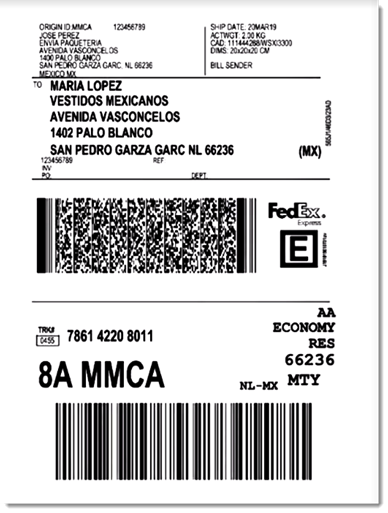
Sample shipping label created through Envia

Choose from a wide variety of shipping carriers, including:

  • FedEx

  • DHL

  • iVoy

  • Redpack

  • UPS

  • Sendex

  • Carssa

  • Paquete Express

  • 99 Minutos

  • Quiken

Notes:

  • Envia is currently available for stores located in the US, Mexico, Colombia, Spain, Brazil, Argentina, Chile, Guatemala, Canada, India, and Australia.

  • Envia is free to use. You pay only for the shipping labels you purchase.

  • You can connect one Wix store to one Envia account.

To integrate with Envia:

  1. Click here to access the app.

  2. Click Add to Site.

  3. Click Agree & Add.

  4. Click Continue.

  5. Enter your email address and click Continue.
    Note: You will be logged into your existing account or a new one will be created.

  6. For new accounts: Fill in the required information and click Continue.

  7. Select an address from the Saved addresses drop-down or complete the fields to add a new one.
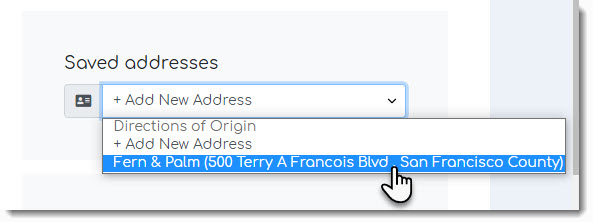
Screenshot of the address list drop-down in the Envia dashboard

  1. Click See Orders.

After integration, new Wix store orders appear in the Envia dashboard every time you make a sale. In the Envia dashboard you can manage your shipments, printing labels and track orders.

When a shipping label is created, the order in your Wix dashboard is updated so that the order status changes to "Fulfilled" and the tracking number is added.

To learn more, check out the Envia help center.

Need A Professional Website?
Contact Us 
Today!

Google Workspace: Purchasing and Setting up a Business Email

Resolving Email Issues

Changing the Priority of Your MX Records

Connecting Email Purchased Outside of Wix

Google Workspace: Adding a DKIM Record to your Business Email

Google Workspace: Adding an SPF Record to your Business Email

Adding a DKIM (TXT) Record

Adding or Updating SPF Records in Your Wix Account

Business Email: General Troubleshooting

Connecting Email Accounts from Different Email Providers for the Same Domain

Increasing Email Deliverability of Emails Sent from Your Business Email

Top Reasons for Using a Personalized Business Email

Business Email: An Overview

Wix Pay Links: Creating and Managing Pay Links in the Wix App

Wix Pay Links: Creating and Managing Pay Links

Wix Proposals: Managing Your Proposals on the Wix App

Wix Proposals by Prospero: Saving and Managing Proposal Templates

Wix Proposals by Prospero: Adding and Setting up Proposals

Wix Price Quotes: Managing Your Price Quotes in the Wix App

Wix Invoices & Price Quotes: Adding Default Notes

Wix Invoices & Price Quotes: Managing Your Settings

Wix Invoices & Price Quotes: Searching, Filtering, and Sorting

Wix Invoices & Price Quotes: Changing Your Initial Document Number

Wix Invoices & Price Quotes: Adding Tax Types

Wix Invoices & Price Quotes: Adding Your Items and Services

Wix Invoices & Price Quotes: Changing Your Currency and Payment Terms

Wix Invoices & Price Quotes: Adding Your Business Info

Wix Invoices: Managing Your Invoices

Wix Invoices: Creating and Managing Recurring Invoices

Wix Invoices: Creating and Managing Recurring Invoices

wix experts
Graphic2Traffic web design
©
bottom of page