top of page

Sending invoices & price quotes

Wix Invoices & Price Quotes: Adding Tax Types

Add different tax types (e.g., VAT, state tax) so that they're easily accessible when creating a new invoice or price quote.

When creating an invoice or price quote, the tax type appears when you click the drop-down menu under Tax. You can also add a new tax type directly from this drop-down menu.

Setting up tax

  1. Go to Settings in your site's dashboard.

  2. Click Getting paid.

  3. Click + Add New Tax in the Taxes section.
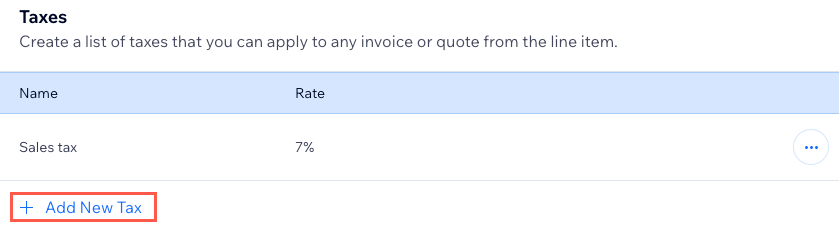
A screenshot showing how to set your tax rates in the Settings section of the dashboard.

  1. Enter the Tax name (e.g., VAT, State Tax) and Rate (%).

  2. Click Save.

Setting how taxes are displayed on the invoice

When creating a new invoice, you can set how taxes are calculated and displayed on the invoice.

Note:

This feature is currently only available for Invoices, but not Price Quotes.

To set how taxes are displayed:

  1. Go to Invoices in your site's dashboard.

  2. Click Create New at the top right and select Invoice.

  3. Enter the relevant details, including products or services.

  4. Hover over the tooltip next to Taxes and click Set tax calculations here. 
    A screenshot showing how to set tax calculation and display when creating new invoices.

  5. Select whether you want to Exclude tax from item price or Include tax in the item's price.

  6. Click Save.

Need A Professional Website?
Contact Us 
Today!

Wix Chat: Automatically Sending Chat Messages or Responding to Chat Messages

Wix Chat: About Notifications

Wix Chat: Deleting Wix Chat

Wix Chat: Adding the WhatsApp Channel to Your Chatbox

Wix Chat: Viewing and Chatting with Live Site Visitors

Wix Chat: Customizing the Chat Icon on Your Mobile Site

Wix Chat: Translating Wix Chat

Wix Chat: Allowing Members to Chat with Each Other Using Members Chat

Wix Chat: Customizing Your Chat Settings

Wix Chat: Designing Your Chatbox

Wix Chat: Adding Wix Chat to Your Site

Wix Chat: An Overview

Your AI Site-Chat Conversations Quota

Designing and Customizing Wix AI Site-Chat

Training Your AI Site-Chat

Testing Your Wix AI Site-Chat

Adding and Setting Up Wix AI Site-Chat

About Wix AI Site-Chat

Wix Inbox: Sending a Broadcast Message to Your Contacts in the Wix App

Wix Inbox: Working with Site Collaborators

Wix Inbox: Connecting WhatsApp Business to Inbox

Wix Inbox: Connecting Your Facebook Page

Wix Inbox: Connecting Instagram to Inbox

Wix Inbox: About Wix Inbox Channels

Wix Inbox: Connecting Your Gmail Account

Wix Inbox: Managing Your Notification Settings

Wix Inbox: Managing Your Inbox

Wix Inbox: Setting Up Your Inbox Profile and Outgoing Emails

Wix Inbox: Sending Messages and Attaching Items

Wix Inbox: An Overview

wix experts
Graphic2Traffic web design
©
bottom of page