top of page

Setting up your restaurant

Wix Restaurants: Inviting People to Manage Your Restaurant

Invite people to collaborate on your Wix Restaurant site and assign them roles based on their responsibilities. With Roles & Permissions, you can create custom roles for restaurant staff to manage menus, online orders, table reservations, and more.
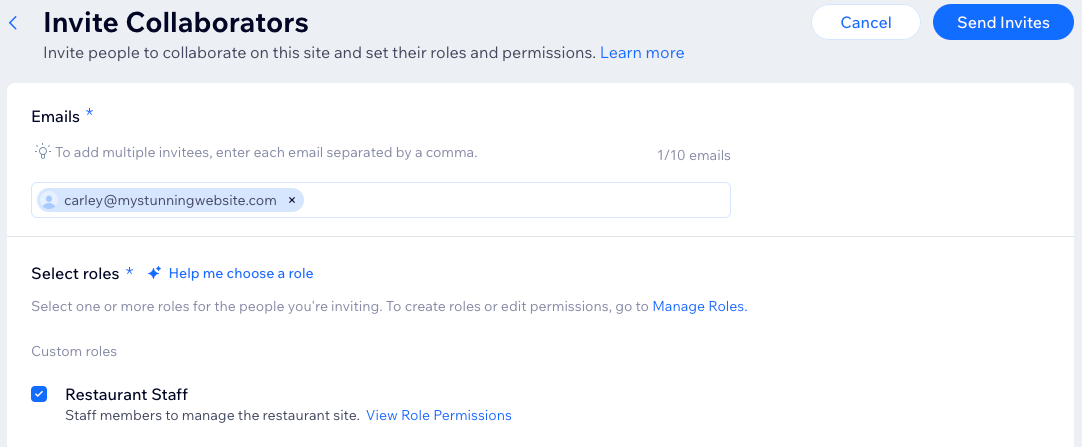
A screenshot of adding people to collaborate on your restaurant site.

To invite people to manage your restaurant:

  1. Go to Roles & Permissions in your site's dashboard.

  2. Click + Invite Collaborators.

  3. Enter the collaborator’s email address.

  4. Scroll down and click + Create Custom Role.

  5. Enter a title and a description for the role.

  6. Scroll down to Restaurants and select the permission(s) to assign:Manage Restaurant: Can manage and edit business info, marketing settings, menus, orders, and reservations.
    Manage Table Reservation settings: Can edit table reservation settings.
    Manage Table Reservations: Can manage and edit table reservations.
    Manage Restaurant Menus: Can view and edit menus.
    Manage Restaurant Orders: Can view and manage restaurant orders.
    Manage Restaurant Orders Settings: Can view and edit restaurant orders settings.
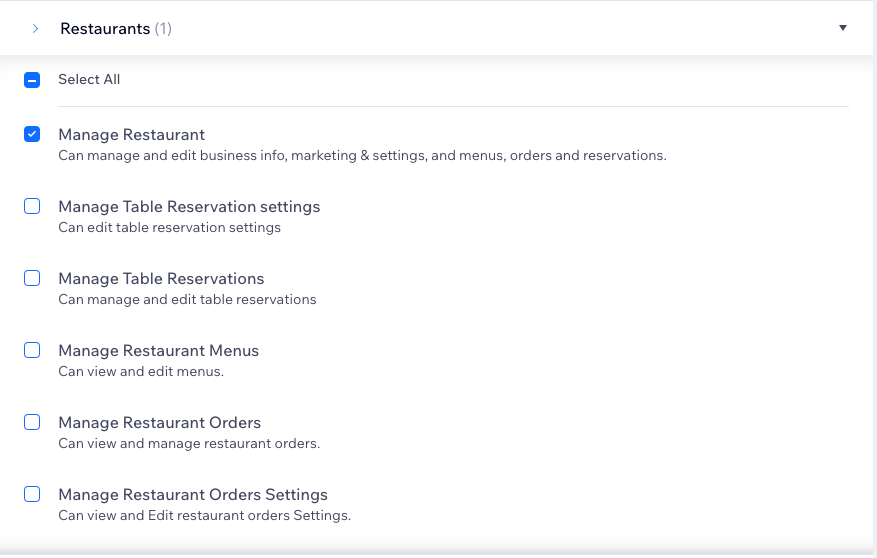
A screenshot of Restaurant specific permissions for this role.

  1. Click Save.

  2. Click Send Invite.

Need A Professional Website?
Contact Us 
Today!

Wix Chat: Automatically Sending Chat Messages or Responding to Chat Messages

Wix Chat: About Notifications

Wix Chat: Deleting Wix Chat

Wix Chat: Adding the WhatsApp Channel to Your Chatbox

Wix Chat: Viewing and Chatting with Live Site Visitors

Wix Chat: Customizing the Chat Icon on Your Mobile Site

Wix Chat: Translating Wix Chat

Wix Chat: Allowing Members to Chat with Each Other Using Members Chat

Wix Chat: Customizing Your Chat Settings

Wix Chat: Designing Your Chatbox

Wix Chat: Adding Wix Chat to Your Site

Wix Chat: An Overview

Your AI Site-Chat Conversations Quota

Designing and Customizing Wix AI Site-Chat

Training Your AI Site-Chat

Testing Your Wix AI Site-Chat

Adding and Setting Up Wix AI Site-Chat

About Wix AI Site-Chat

Wix Inbox: Sending a Broadcast Message to Your Contacts in the Wix App

Wix Inbox: Working with Site Collaborators

Wix Inbox: Connecting WhatsApp Business to Inbox

Wix Inbox: Connecting Your Facebook Page

Wix Inbox: Connecting Instagram to Inbox

Wix Inbox: About Wix Inbox Channels

Wix Inbox: Connecting Your Gmail Account

Wix Inbox: Managing Your Notification Settings

Wix Inbox: Managing Your Inbox

Wix Inbox: Setting Up Your Inbox Profile and Outgoing Emails

Wix Inbox: Sending Messages and Attaching Items

Wix Inbox: An Overview

wix experts
Graphic2Traffic web design
©
bottom of page