top of page

Wix Inbox FAQ

Wix Inbox: Sending a Broadcast Message to Your Contacts in the Wix App

Broadcast messages allow you to send a single message to multiple contacts at once from the Wix app. Choose whether contacts receive the message via Wix Chat (in their preferred member app) or by email. Even though you send a single broadcast message, your contacts receive the messages separately.

For example, send a broadcast message to all clients who have booked into a Monday online class reminding them of the class date and start time.
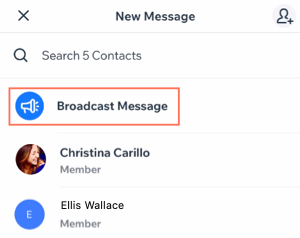
To send a broadcast message from your inbox:

  1. Open the Wix app.

  2. Tap the Inbox icon .

  3. Tap the Compose icon .

  4. Tap Broadcast Message.

  5. Tap on the contacts you want to send a broadcast message to. The contacts receive the messages separately (not as a group message).

  6. Tap Next.

  7. Tap the channel drop-down at the bottom left and select how you want to send your broadcast:Chat: Send a chat message to members. They will see the message in their member app (e.g. Spaces by Wix). To chat with members, make sure you've installed Wix Chat on your site.
    Email: Send a broadcast message via email to contacts who have provided an email address that is saved in your contact list.

  8. Compose your broadcast message. You can attach elements to your message.

  9. Tap Send.

Need A Professional Website?
Contact Us 
Today!

Wix Chat: Automatically Sending Chat Messages or Responding to Chat Messages

Wix Chat: About Notifications

Wix Chat: Deleting Wix Chat

Wix Chat: Adding the WhatsApp Channel to Your Chatbox

Wix Chat: Viewing and Chatting with Live Site Visitors

Wix Chat: Customizing the Chat Icon on Your Mobile Site

Wix Chat: Translating Wix Chat

Wix Chat: Allowing Members to Chat with Each Other Using Members Chat

Wix Chat: Customizing Your Chat Settings

Wix Chat: Designing Your Chatbox

Wix Chat: Adding Wix Chat to Your Site

Wix Chat: An Overview

Your AI Site-Chat Conversations Quota

Designing and Customizing Wix AI Site-Chat

Training Your AI Site-Chat

Testing Your Wix AI Site-Chat

Adding and Setting Up Wix AI Site-Chat

About Wix AI Site-Chat

Wix Inbox: Sending a Broadcast Message to Your Contacts in the Wix App

Wix Inbox: Working with Site Collaborators

Wix Inbox: Connecting WhatsApp Business to Inbox

Wix Inbox: Connecting Your Facebook Page

Wix Inbox: Connecting Instagram to Inbox

Wix Inbox: About Wix Inbox Channels

Wix Inbox: Connecting Your Gmail Account

Wix Inbox: Managing Your Notification Settings

Wix Inbox: Managing Your Inbox

Wix Inbox: Setting Up Your Inbox Profile and Outgoing Emails

Wix Inbox: Sending Messages and Attaching Items

Wix Inbox: An Overview

wix experts
Graphic2Traffic web design
©
bottom of page