top of page

Creating your Wix Restaurants menu

Wix Restaurants: Creating a Combo Meal

Important:

This article is about the original Wix Restaurants Menus App. Try out our new menu app. Learn how to add and set up Wix Restaurants Menus (New) app.

You can offer a combo meal on your menu when you want to sell two or more dishes for a special price. For example, you may offer a special family dinner combo with multiple dishes, or a lunch special that includes a starter, main course and a beverage.

Before you begin:

Make sure that the dishes you want to add to the combo meal are available on your menu. Learn how to add dishes to your menu.

To create a combo meal:

  1. Go to Menus in your site's dashboard.

  2. Navigate to the relevant menu section.

  3. Click Add Dish.

  4. Enter the combo meal details:Name: Enter a name for the combo meal.
    Price: Enter a price for the combo meal.
    Tax: Enter taxes for the combo meal, if applicable.
    Description: Enter a description for the combo meal.
    Dish Labels: Add relevant labels to your combo meal (Special, Vegan, Vegetarian, Gluten Free, Organic and Spicy levels).
    Visibility: Select to show this combo meal to customers in the menu.
    Image: Click to add an image to the combo meal.
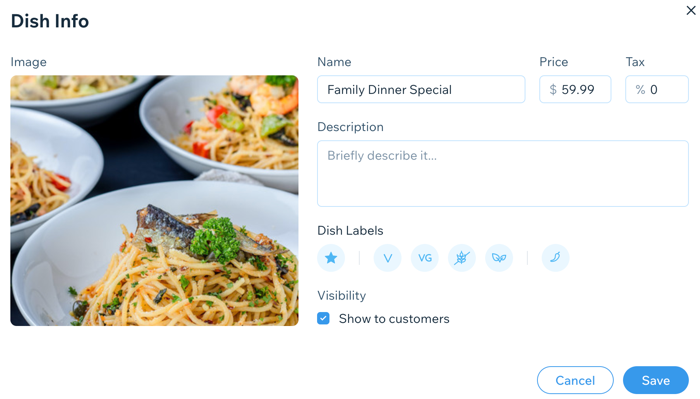
A screenshot of adding details to dish info.

  1. Click Save.

  2. Click + New Option and then New Option.

  3. Click New Choice at the top right and then Select Existing.

  4. Hover over and select the existing dishes you'd like to add to the combo meal.

  5. Click Add.
    Note: The dishes are added with their dish options. To remove the dish options, click Use without.

  6. Click Add.

Need A Professional Website?
Contact Us 
Today!

Google Workspace: Purchasing and Setting up a Business Email

Resolving Email Issues

Changing the Priority of Your MX Records

Connecting Email Purchased Outside of Wix

Google Workspace: Adding a DKIM Record to your Business Email

Google Workspace: Adding an SPF Record to your Business Email

Adding a DKIM (TXT) Record

Adding or Updating SPF Records in Your Wix Account

Business Email: General Troubleshooting

Connecting Email Accounts from Different Email Providers for the Same Domain

Increasing Email Deliverability of Emails Sent from Your Business Email

Top Reasons for Using a Personalized Business Email

Business Email: An Overview

Wix Pay Links: Creating and Managing Pay Links in the Wix App

Wix Pay Links: Creating and Managing Pay Links

Wix Proposals: Managing Your Proposals on the Wix App

Wix Proposals by Prospero: Saving and Managing Proposal Templates

Wix Proposals by Prospero: Adding and Setting up Proposals

Wix Price Quotes: Managing Your Price Quotes in the Wix App

Wix Invoices & Price Quotes: Adding Default Notes

Wix Invoices & Price Quotes: Managing Your Settings

Wix Invoices & Price Quotes: Searching, Filtering, and Sorting

Wix Invoices & Price Quotes: Changing Your Initial Document Number

Wix Invoices & Price Quotes: Adding Tax Types

Wix Invoices & Price Quotes: Adding Your Items and Services

Wix Invoices & Price Quotes: Changing Your Currency and Payment Terms

Wix Invoices & Price Quotes: Adding Your Business Info

Wix Invoices: Managing Your Invoices

Wix Invoices: Creating and Managing Recurring Invoices

Wix Invoices: Creating and Managing Recurring Invoices

wix experts
Graphic2Traffic web design
©
bottom of page