top of page

Creating your Wix Restaurants menu

Wix Restaurants: Archiving and Restoring Menus, Sections, and Dishes

Important:

This article is about the original Wix Restaurants Menus App. Try out our new, improved menu app. Learn how to add and set up Wix Restaurants Menus (New) app.

If you no longer wish to use a menu, section or dish, you can archive them and restore them later at anytime. You can also clear your archive to permanently delete all of your archived menu items.

In this article, learn how to:

Archiving menus, sections and dishes

You can archive a menu, section or dish and remove them from Menus in your site's dashboard. Archiving does not permanently delete the menu, section or dish, and allows restoring them at any time.

Important:

You can't use archived dishes as options for other menu items. Once you archive dishes, any other menu item tied to the archived dish won't be available.

To archive a menu, section or dish:

  1. Go to Menus in your site's dashboard.

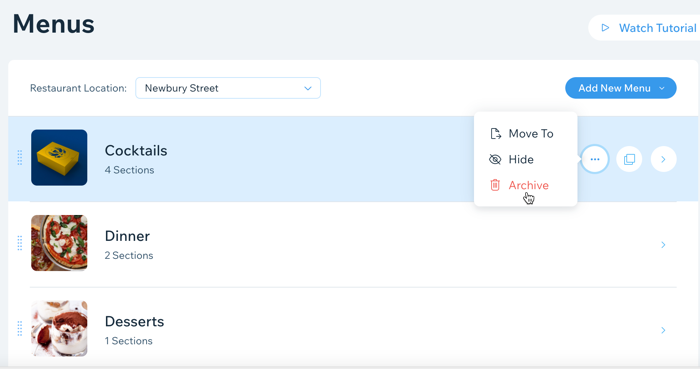
  2. Hover over the relevant menu, section or dish and click the Show More icon .

  3. Click Archive.

A screenshot of clicking Archive on a menu to archive it.

Restoring menus, sections and dishes

You can easily restore a menu, section and dish that you've previously archived. All of the menus, sections and dishes that you've previously archived are saved under Menus Archive in Menus.

To restore a menu, section and dish:

  1. Go to Menus in your site's dashboard.

  2. Scroll to the bottom and click Menus Archive.

  3. Click the Menus, Sections or Dishes tab.

  4. Hover over the relevant menu, section or dish and click the Restore icon.
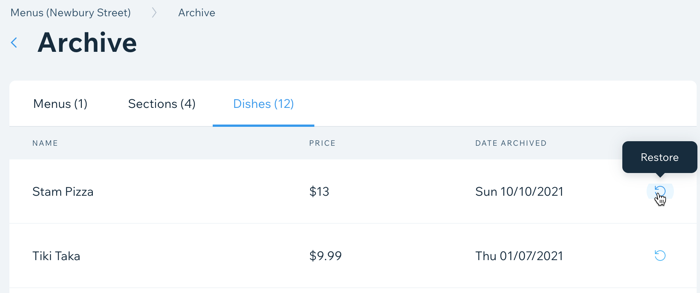
A screenshot of restoring an archived menu item.

Deleting your archived menu items

You can clear your archive to permanently delete all of your archived menu items. This action cannot be undone.

To permanently delete your archive:

  1. Go to Menus in your site's dashboard.

  2. Scroll to the bottom and click Menus Archive.

  3. Click the More Actions icon at the top left.

  4. Click Clear Archive.

  5. Click Clear Archive again to confirm.
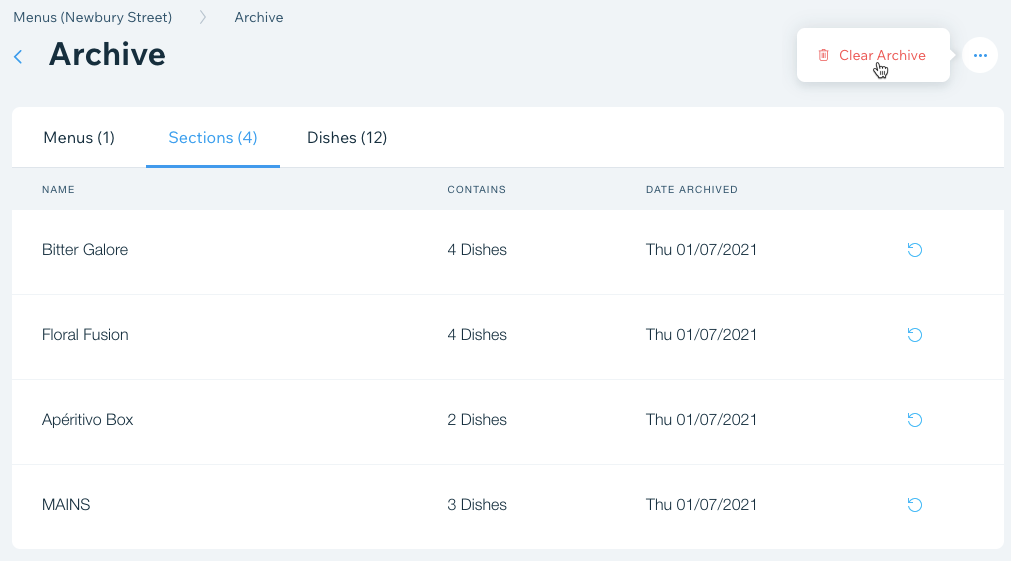
A screenshot of clicking Clear Archive in your Menus Archive to permanently delete your archived menu items.

Need A Professional Website?
Contact Us 
Today!

Google Workspace: Purchasing and Setting up a Business Email

Resolving Email Issues

Changing the Priority of Your MX Records

Connecting Email Purchased Outside of Wix

Google Workspace: Adding a DKIM Record to your Business Email

Google Workspace: Adding an SPF Record to your Business Email

Adding a DKIM (TXT) Record

Adding or Updating SPF Records in Your Wix Account

Business Email: General Troubleshooting

Connecting Email Accounts from Different Email Providers for the Same Domain

Increasing Email Deliverability of Emails Sent from Your Business Email

Top Reasons for Using a Personalized Business Email

Business Email: An Overview

Wix Pay Links: Creating and Managing Pay Links in the Wix App

Wix Pay Links: Creating and Managing Pay Links

Wix Proposals: Managing Your Proposals on the Wix App

Wix Proposals by Prospero: Saving and Managing Proposal Templates

Wix Proposals by Prospero: Adding and Setting up Proposals

Wix Price Quotes: Managing Your Price Quotes in the Wix App

Wix Invoices & Price Quotes: Adding Default Notes

Wix Invoices & Price Quotes: Managing Your Settings

Wix Invoices & Price Quotes: Searching, Filtering, and Sorting

Wix Invoices & Price Quotes: Changing Your Initial Document Number

Wix Invoices & Price Quotes: Adding Tax Types

Wix Invoices & Price Quotes: Adding Your Items and Services

Wix Invoices & Price Quotes: Changing Your Currency and Payment Terms

Wix Invoices & Price Quotes: Adding Your Business Info

Wix Invoices: Managing Your Invoices

Wix Invoices: Creating and Managing Recurring Invoices

Wix Invoices: Creating and Managing Recurring Invoices

wix experts
Graphic2Traffic web design
©
bottom of page