top of page

Taking online orders

Wix Restaurants: Allowing Customers to Place Orders for a Future Date

Important:

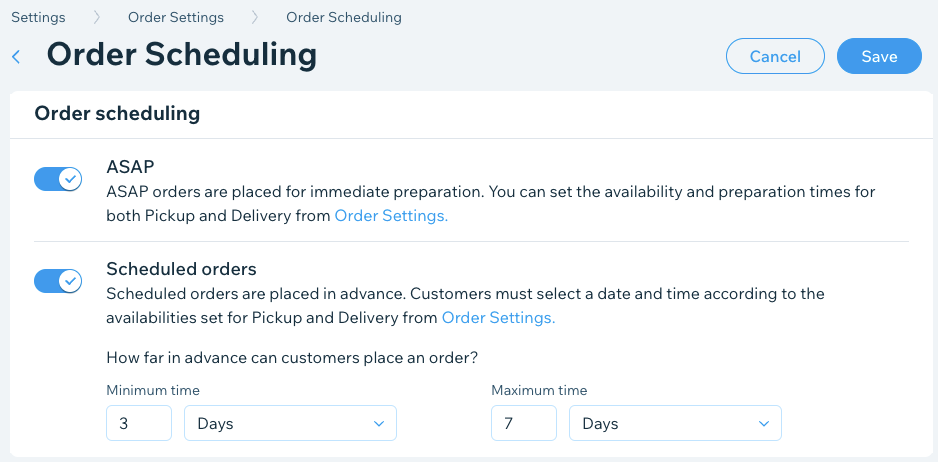
You can give customers the option of placing orders a few hours or days before the delivery time. For example, a bakery needs a few days notice in order to bake and decorate a birthday or a wedding cake. You can set a minimum time in advance (e.g. 3 days) that customers need to book in order to get their order delivered when they want it.

Tip:

Do you have a catering business? To learn how to transform your site into a catering site, click here.

To enable future ordering:

  1. Go to Order Settings in your site's dashboard.

  2. Click Order scheduling.

  3. Click the Scheduled orders toggle to enable and set how far in advance customers can place an order:Minimum time: Enter a number and select Minutes, Hours or Days from the drop-down list.
    Note: This is the minimum time customers can place a future order in advance.
    Maximum time: Enter a maximum number and select Minutes, Hours or Days from the drop-down list.
    Note: This is the maximum time customers can place a future order in advance.

  4. (Optional) Disable the ASAP toggle to accept future orders only.

  5. Click Save.

A screenshot of setting your schedule for online orders, whether ords can be placed immediately or in advance.

Note:

If you require customers to pick a delivery date and time, the Order Now button is inactive until your customer chooses a time.

Need A Professional Website?
Contact Us 
Today!

Google Workspace: Purchasing and Setting up a Business Email

Resolving Email Issues

Changing the Priority of Your MX Records

Connecting Email Purchased Outside of Wix

Google Workspace: Adding a DKIM Record to your Business Email

Google Workspace: Adding an SPF Record to your Business Email

Adding a DKIM (TXT) Record

Adding or Updating SPF Records in Your Wix Account

Business Email: General Troubleshooting

Connecting Email Accounts from Different Email Providers for the Same Domain

Increasing Email Deliverability of Emails Sent from Your Business Email

Top Reasons for Using a Personalized Business Email

Business Email: An Overview

Wix Pay Links: Creating and Managing Pay Links in the Wix App

Wix Pay Links: Creating and Managing Pay Links

Wix Proposals: Managing Your Proposals on the Wix App

Wix Proposals by Prospero: Saving and Managing Proposal Templates

Wix Proposals by Prospero: Adding and Setting up Proposals

Wix Price Quotes: Managing Your Price Quotes in the Wix App

Wix Invoices & Price Quotes: Adding Default Notes

Wix Invoices & Price Quotes: Managing Your Settings

Wix Invoices & Price Quotes: Searching, Filtering, and Sorting

Wix Invoices & Price Quotes: Changing Your Initial Document Number

Wix Invoices & Price Quotes: Adding Tax Types

Wix Invoices & Price Quotes: Adding Your Items and Services

Wix Invoices & Price Quotes: Changing Your Currency and Payment Terms

Wix Invoices & Price Quotes: Adding Your Business Info

Wix Invoices: Managing Your Invoices

Wix Invoices: Creating and Managing Recurring Invoices

Wix Invoices: Creating and Managing Recurring Invoices

wix experts
Graphic2Traffic web design
©
bottom of page