top of page

Taking online orders

Wix Restaurants: Allowing Customers to Add a Tip to an Order

Important:

Make payments easier for customers with a good checkout experience by allowing them to add a tip to their credit card when paying. You can customize the default tip options and allow customers to leave a tip in their requested amount.
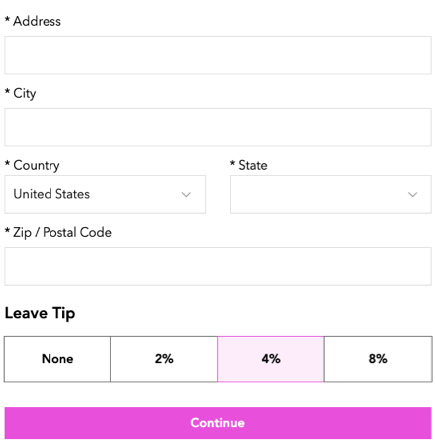
A screenshot of how customers can leave a tip.

Before you begin:

Verify that you have set up your payment methods in your payment settings. Tips don't work with manual/offline payments.

To allow customers to add a tip:

  1. Go to Order Settings in your site's dashboard.

  2. Click the Advanced tab at the bottom.

  3. Enable the Tips toggle to allow customers to leave a tip when placing an order.
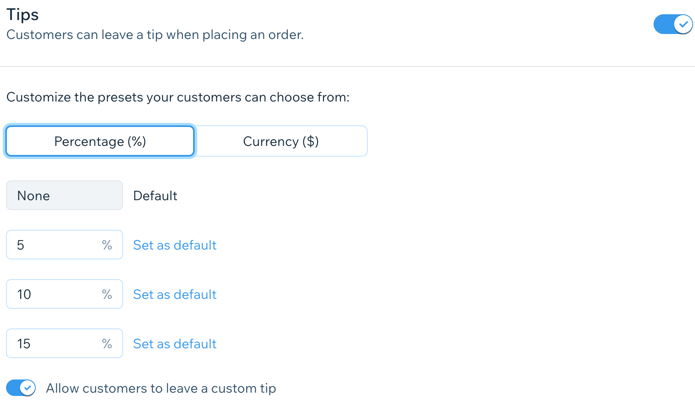
A screenshot of setting up tips.

  1. (Optional) Customize the preset tip options:Click to select a default unit for the tip (Percentage or Currency).
    Enter 3 different values for the preset tip in the text fields.
    Note: You can click Set as default by one of the preset amounts to select it as the default for tips.

  2. Enable the Allow customers to leave a custom tip toggle to allow customers to leave a tip in their desired amount.

  3. Click Save.

Need A Professional Website?
Contact Us 
Today!

Wix Retail POS: Allowing Customers to Leave Tips

Wix Retail POS: Setting Up Text Receipts

Wix Retail POS: Allowing Customers to Redeem Loyalty Points

Wix Retail POS: Enabling Automatic Discounts

Wix Retail POS: Receiving Notifications

Wix Retail POS: Selling Physical Gift Cards

Wix Retail POS: Selling Virtual Gift Cards

Wix Retail POS: Managing Discounts

Wix Retail POS: Organizing Your Favorites Screen

Wix Retail POS: Disabling Payment Methods

Wix Retail POS: Managing Tax Collection

Wix Retail POS: About the Retail POS Plan

Wix Retail POS: Using Wix Payments as Your Payment Provider

Wix Retail POS: Troubleshooting Your Wix POS

Wix Retail POS: Using the Moneris Go Terminal Card Reader

Wix Retail POS: Connecting a Network Card Reader

Wix Retail POS: Contacting Wix Customer Care for POS Support

Wix POS Terms of Service

Wix Retail POS: Device Security Guidelines

Wix Retail POS: Troubleshooting Your Barcode Scanner

Wix Retail POS: Troubleshooting Your HP Terminal Receipt Printer

Wix Retail POS: Troubleshooting Your Cash Drawer

Wix Retail POS: Updating and Troubleshooting Your Card Reader

Wix Retail POS: Troubleshooting Your Tablet

Wix Retail POS: Updating the Tablet

Wix Retail POS: Checking the Status of Your Hardware

Wix Retail POS: Setting Up the Receipt Printer

Wix Retail POS: About Your HP Barcode Scanner

Wix Retail POS: Using the BBPOS Chipper 2X Card Reader

Wix Retail POS: Managing Your Cash Drawer

wix experts
Graphic2Traffic web design
©
bottom of page