top of page

Taking online orders

Wix Restaurants: Accepting Orders in the Wix App

Important:

View incoming orders in real-time directly from the Wix app and accept them with just a swipe to the right. You'll get a notification as soon as a customer places an order on your restaurant site. You can tap an order to see its details and a price breakdown, and print or email the order. In cases where you're unable to fulfill an order, you can also reject it directly from the app.

To accept incoming restaurant orders in the Wix app:

  1. Go to your site in the Wix app.

  2. Tap Manage at the bottom right.

  3. Tap Restaurant Orders. The New tab displays the new orders waiting to be accepted or rejected.

  4. Tap on the order you want to accept.

  5. Review the order and then tap Accept Order at the bottom to accept it.

The newly accepted orders now appear in the In Progress tab. Once you've completed the order, tap Fulfill Order.
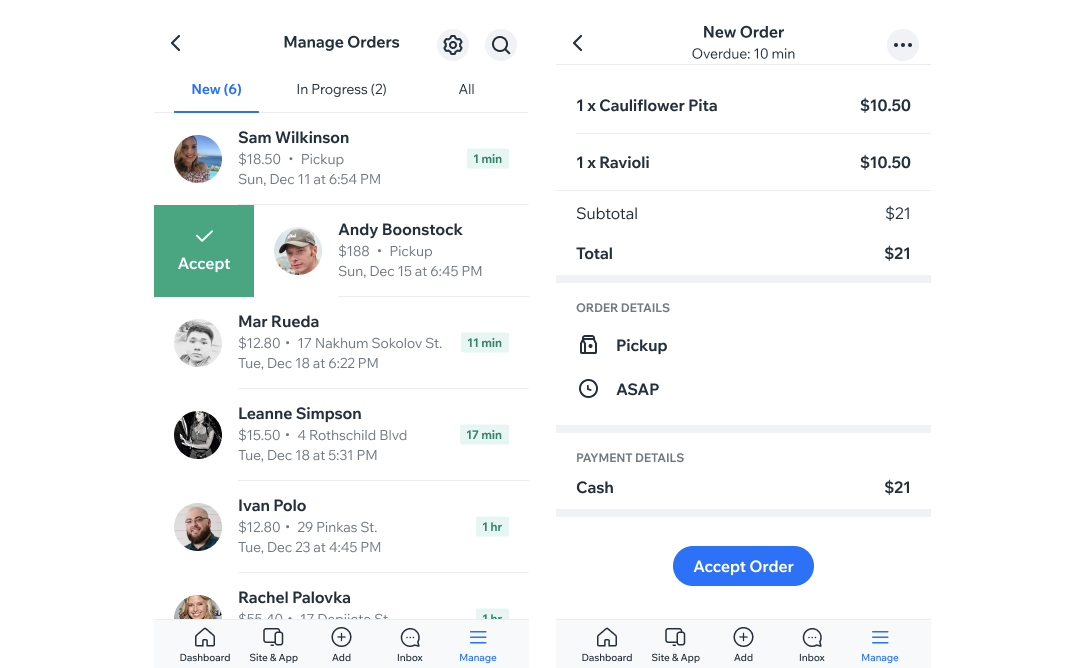
Two screenshots of your restaurant orders in the Wix Owner app and viewing an order in the app.

Tip:

You can swipe an order to the right to quickly accept it.

Need A Professional Website?
Contact Us 
Today!

Wix Chat: Automatically Sending Chat Messages or Responding to Chat Messages

Wix Chat: About Notifications

Wix Chat: Deleting Wix Chat

Wix Chat: Adding the WhatsApp Channel to Your Chatbox

Wix Chat: Viewing and Chatting with Live Site Visitors

Wix Chat: Customizing the Chat Icon on Your Mobile Site

Wix Chat: Translating Wix Chat

Wix Chat: Allowing Members to Chat with Each Other Using Members Chat

Wix Chat: Customizing Your Chat Settings

Wix Chat: Designing Your Chatbox

Wix Chat: Adding Wix Chat to Your Site

Wix Chat: An Overview

Your AI Site-Chat Conversations Quota

Designing and Customizing Wix AI Site-Chat

Training Your AI Site-Chat

Testing Your Wix AI Site-Chat

Adding and Setting Up Wix AI Site-Chat

About Wix AI Site-Chat

Wix Inbox: Sending a Broadcast Message to Your Contacts in the Wix App

Wix Inbox: Working with Site Collaborators

Wix Inbox: Connecting WhatsApp Business to Inbox

Wix Inbox: Connecting Your Facebook Page

Wix Inbox: Connecting Instagram to Inbox

Wix Inbox: About Wix Inbox Channels

Wix Inbox: Connecting Your Gmail Account

Wix Inbox: Managing Your Notification Settings

Wix Inbox: Managing Your Inbox

Wix Inbox: Setting Up Your Inbox Profile and Outgoing Emails

Wix Inbox: Sending Messages and Attaching Items

Wix Inbox: An Overview

wix experts
Graphic2Traffic web design
©
bottom of page