top of page

Sending invoices & price quotes

Wix Price Quotes: Converting Price Quotes into Invoices

Price Quotes is closely connected to Wix Invoices. After a client accepts your price quote, you can convert it into an invoice to receive the payment. All the information from the quote will automatically be included in the invoice.

Enabling automatic conversion to invoices

By default, price quotes do not automatically convert to invoices when they are accepted. You can choose to enable the auto-conversion so that your price quotes are automatically turned into invoices when they're accepted.

To enable auto-conversion:

  1. Go to Settings in your site's dashboard.

  2. Click Getting Paid Settings.

  3. Click Price Quotes.

  4. Enable the Convert accepted quotes toggle.

A sccrenshot showing the convert accepted quotes toggle in price quotes under getting paid settings in the dashboard.

Manually converting a price quote to an invoice

If auto-conversion is disabled, follow the steps below to convert a price quote into an invoice automatically.

To manually convert a price quote into an invoice:

  1. Go to Price Quotes in your site's dashboard.

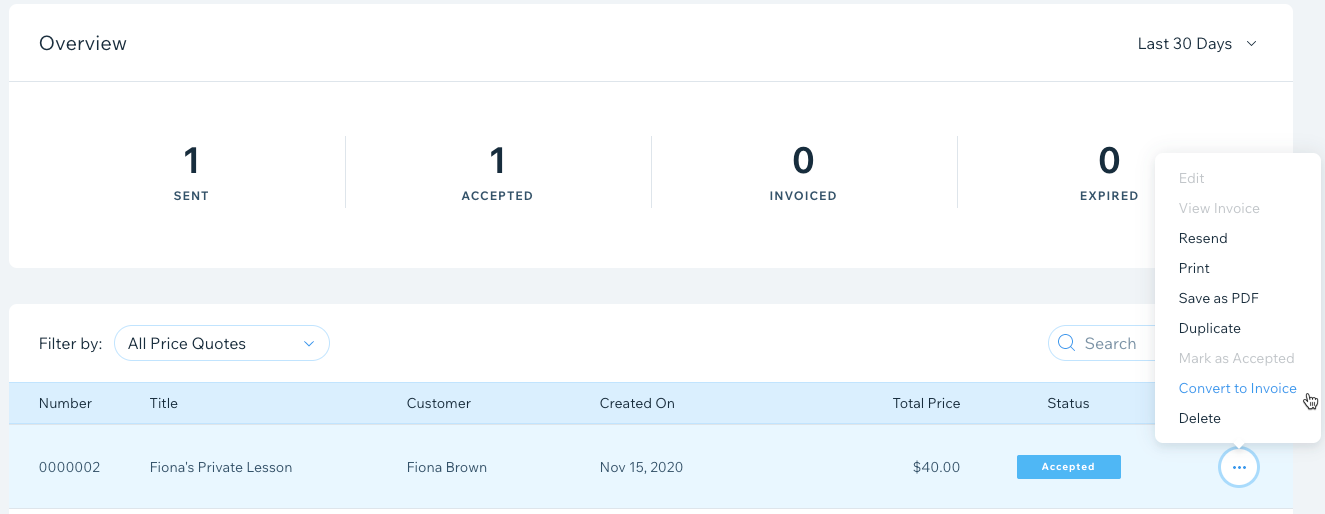
  2. Click the More Actions icon  next to the price quote you want to convert.

  3. Click Convert to Invoice.

A screenshot showing how to manually convert a price quote to an invoice in the dashboard.

  1. Click Convert to confirm.

Need A Professional Website?
Contact Us 
Today!

Wix Retail POS: Allowing Customers to Leave Tips

Wix Retail POS: Setting Up Text Receipts

Wix Retail POS: Allowing Customers to Redeem Loyalty Points

Wix Retail POS: Enabling Automatic Discounts

Wix Retail POS: Receiving Notifications

Wix Retail POS: Selling Physical Gift Cards

Wix Retail POS: Selling Virtual Gift Cards

Wix Retail POS: Managing Discounts

Wix Retail POS: Organizing Your Favorites Screen

Wix Retail POS: Disabling Payment Methods

Wix Retail POS: Managing Tax Collection

Wix Retail POS: About the Retail POS Plan

Wix Retail POS: Using Wix Payments as Your Payment Provider

Wix Retail POS: Troubleshooting Your Wix POS

Wix Retail POS: Using the Moneris Go Terminal Card Reader

Wix Retail POS: Connecting a Network Card Reader

Wix Retail POS: Contacting Wix Customer Care for POS Support

Wix POS Terms of Service

Wix Retail POS: Device Security Guidelines

Wix Retail POS: Troubleshooting Your Barcode Scanner

Wix Retail POS: Troubleshooting Your HP Terminal Receipt Printer

Wix Retail POS: Troubleshooting Your Cash Drawer

Wix Retail POS: Updating and Troubleshooting Your Card Reader

Wix Retail POS: Troubleshooting Your Tablet

Wix Retail POS: Updating the Tablet

Wix Retail POS: Checking the Status of Your Hardware

Wix Retail POS: Setting Up the Receipt Printer

Wix Retail POS: About Your HP Barcode Scanner

Wix Retail POS: Using the BBPOS Chipper 2X Card Reader

Wix Retail POS: Managing Your Cash Drawer

wix experts
Graphic2Traffic web design
©
bottom of page