top of page

Wix Portfolio

Wix Portfolio: Adding a Project Page to a Site Menu

Showcase and attract more visitors to a portfolio project by adding it to a site menu. By linking your project to a menu, site visitors can click into your work from any page on your site.

A screenshot of project page added to a live site's menu.

To add a project page to a site menu:

Wix Editor

Studio Editor

  1. Go to your editor.

  2. Click the menu you want to add a link to.

  3. Click Manage Menu.

  4. Click Add Menu Item at the bottom of the page.
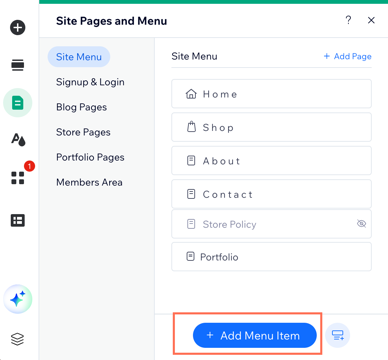
A screenshot showing the option to add an item to your menu.

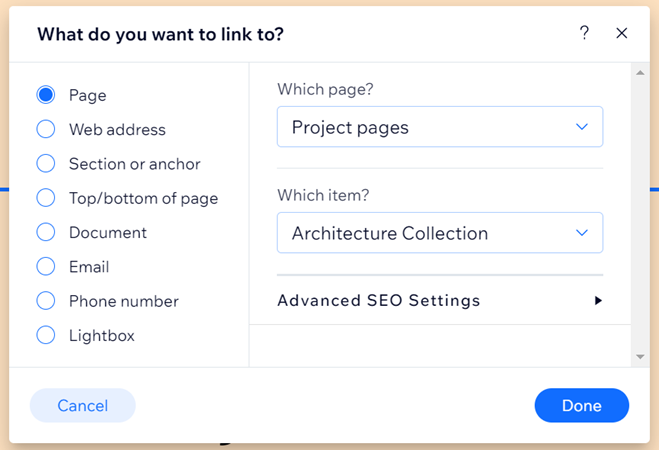
  1. Select Link.

  2. Select Page.

  3. Click the Which page? drop-down and select Project pages.

  4. Click the Which item? drop-down and select the project you want to link to. 
    Note: This option only appears if your projects are connected to a collection, and you have more than one project within that collection.

  5. Click Done.

  6. Update the name of the link as it will display on your site menu.

  7. Click Done.

A screenshot of a project page selected.

Need A Professional Website?
Contact Us 
Today!

Google Workspace: Purchasing and Setting up a Business Email

Resolving Email Issues

Changing the Priority of Your MX Records

Connecting Email Purchased Outside of Wix

Google Workspace: Adding a DKIM Record to your Business Email

Google Workspace: Adding an SPF Record to your Business Email

Adding a DKIM (TXT) Record

Adding or Updating SPF Records in Your Wix Account

Business Email: General Troubleshooting

Connecting Email Accounts from Different Email Providers for the Same Domain

Increasing Email Deliverability of Emails Sent from Your Business Email

Top Reasons for Using a Personalized Business Email

Business Email: An Overview

Wix Pay Links: Creating and Managing Pay Links in the Wix App

Wix Pay Links: Creating and Managing Pay Links

Wix Proposals: Managing Your Proposals on the Wix App

Wix Proposals by Prospero: Saving and Managing Proposal Templates

Wix Proposals by Prospero: Adding and Setting up Proposals

Wix Price Quotes: Managing Your Price Quotes in the Wix App

Wix Invoices & Price Quotes: Adding Default Notes

Wix Invoices & Price Quotes: Managing Your Settings

Wix Invoices & Price Quotes: Searching, Filtering, and Sorting

Wix Invoices & Price Quotes: Changing Your Initial Document Number

Wix Invoices & Price Quotes: Adding Tax Types

Wix Invoices & Price Quotes: Adding Your Items and Services

Wix Invoices & Price Quotes: Changing Your Currency and Payment Terms

Wix Invoices & Price Quotes: Adding Your Business Info

Wix Invoices: Managing Your Invoices

Wix Invoices: Creating and Managing Recurring Invoices

Wix Invoices: Creating and Managing Recurring Invoices

wix experts
Graphic2Traffic web design
©
bottom of page