Setting up Photo Albums
Wix Photo Albums: Changing Your Album's Privacy Permissions
Manage access to your album, including setting whether or not a password is required to view it. Keep track of how your photos are used by controlling sharing, downloads, and more.
Notes:
Adding a password to your cover page protects your entire album unless someone has a direct link to an inner page.
Disable SEO in albums with password protection set up to ensure that inner pages of private albums do not appear in search results.
Password-protected photo albums are not available on the Spaces by Wix app.
To change your album's privacy permissions:
Go to Photo Albums in your site's dashboard.
Click Manage Album next to the relevant album.
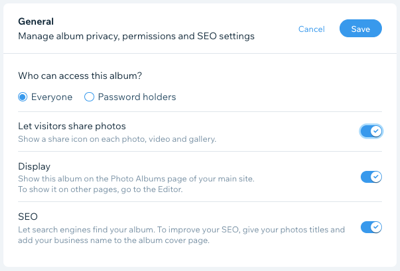
Set your album's privacy, permissions and SEO settings:Click the drop-down in the General section to expand it.
Set your album access in the Who can access this album? section:Everyone: Anyone with the album URL can view this album.
Password holders: Visitors need a password to view your photo album. Set your password and language:Enter a password in the What's the password for this album? field.
Note: Click Show Password to view the password you've entered.
Select the language of your album using the Choose the language visitors will see your album in drop-down.
Enable the Let visitors share photos toggle to show a Share icon on each photo, video and gallery.
Enable the Display toggle to show this album on the Photo Albums page of your main site.
Note: To show it on other pages, go to the Editor.
Enable the SEO toggle to let search engines find your album.
Note: We recommend disabling SEO for password-protected albums, to prevent people finding links to inner pages of your password-protected albums.
Click Save.
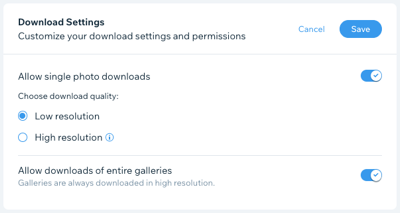
Set your album's download settings:Click the drop-down in the Download Settings section to expand it.
Enable the Allow single photo downloads toggle to display a Download icon next to your photos, allowing visitors to download single photos. Select the image resolution:Low resolution: Allow visitors to download a lower-quality version of your image.
High resolution: Allow visitors to download your image in its original quality.
Enable the Allow downloads of entire galleries toggle to display a Download icon next to your galleries, allowing visitors to download full galleries.