


Getting Started with Wix Payments
Wix Payments: Adding Affirm as a Payment Method
Add Affirm as a payment method to help your customers spread their payment over a number of installments. Affirm supports buy now, pay later (BNPL) transactions. This means you get fully paid upfront, while your customers can purchase today and make affordable payments over time.
Before you begin:
You must set up Wix Payments to accept payments via Affirm through Wix Payments.
Affirm through Wix Payments is currently available only in the United States.
Items sold via Affirm are subject to our list of prohibited goods and services, as well as Affirm's payment terms. Learn more about qualifying for Affirm.
General Info
Supported countries
United States
Supported currencies
USD
Processing fees
USA: 6% + 30c per transaction
Payment types
Pay in 4 (4 interest free installments)
Monthly installments (Up to 36 months)
Credit limits
$50 - $17,500
Notes
The currency used in your Wix account must match the currency in your Wix Payments account. If the currencies do not match, the transactions may be declined. Learn how to change your currency
In this article, learn about:
Adding Affirm
Go to Accept Payments in your site's dashboard.
Click Manage next to Wix Payments.
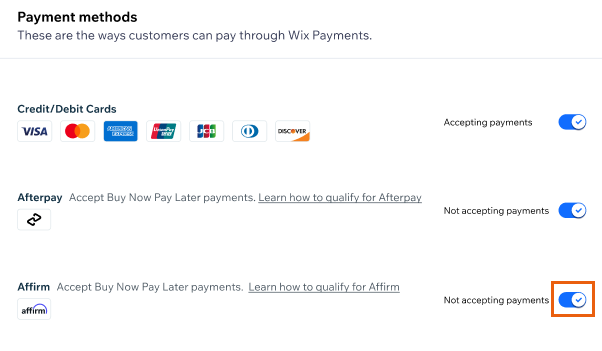
Enable the toggle next to Affirm.
Note: You can disable the toggle at any time to remove Affirm from your payment options.
FAQs
Click a question below to learn more about using Affirm in Wix.
Can I connect Affirm without connecting Wix Payments?
Yes. You can connect Affirm as a payment provider without connecting Wix Payments.
Can I issue refunds for Affirm payments?
Yes. You can refund Affirm payments up to 120 days after the original payment. Once a refund is initiated, any further payments due are paused.