top of page

Setting up Online Programs

Wix Online Programs: Translating Your Online Programs

Expand your Online Programs to a wider audience using Wix Multilingual. You can streamline the translation process for your programs through the Translation Manager in your site's dashboard.

Whether your programs are scheduled or self-paced, you can manage translations for each program type.
Before you begin:

First, you need to add and set up Wix Multilingual. You can add Wix Multilingual from your editor, your site's dashboard, or from the Wix App Market.

To manage translations in your site's dashboard:

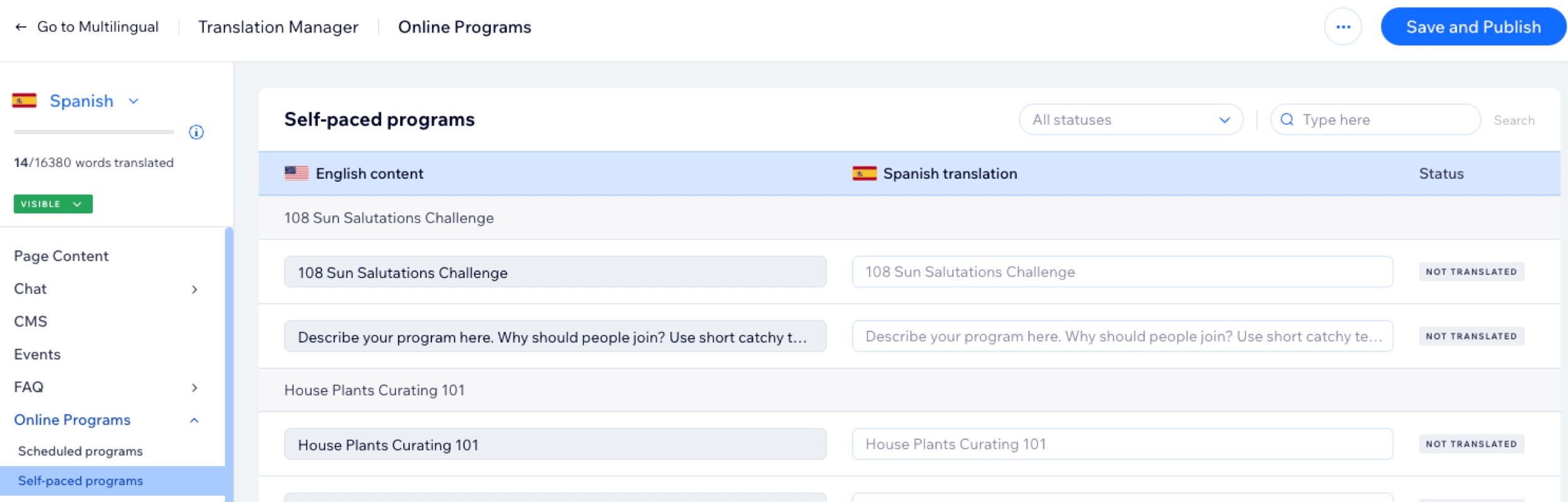
  1. Go to Translation Manager in your site's dashboard.

  2. Hover over Online Programs on the left and click on the relevant program type: Scheduled programs or Self-paced programs 
    Note:
    It is only possible to translate published and active programs.

  3. Choose the relevant option:If you auto-translated your site: Review the automated translations and edit if necessary.
    If you didn't use auto-translation: Translate the custom fields and policies manually.

  4. Click Save and Publish.

A screenshot of the translation manager in a site's dashboard.

Note:

Currently, it is not possible to override the Online Programs widget texts in secondary languages in your editor.

Need A Professional Website?
Contact Us 
Today!

Wix Chat: Automatically Sending Chat Messages or Responding to Chat Messages

Wix Chat: About Notifications

Wix Chat: Deleting Wix Chat

Wix Chat: Adding the WhatsApp Channel to Your Chatbox

Wix Chat: Viewing and Chatting with Live Site Visitors

Wix Chat: Customizing the Chat Icon on Your Mobile Site

Wix Chat: Translating Wix Chat

Wix Chat: Allowing Members to Chat with Each Other Using Members Chat

Wix Chat: Customizing Your Chat Settings

Wix Chat: Designing Your Chatbox

Wix Chat: Adding Wix Chat to Your Site

Wix Chat: An Overview

Your AI Site-Chat Conversations Quota

Designing and Customizing Wix AI Site-Chat

Training Your AI Site-Chat

Testing Your Wix AI Site-Chat

Adding and Setting Up Wix AI Site-Chat

About Wix AI Site-Chat

Wix Inbox: Sending a Broadcast Message to Your Contacts in the Wix App

Wix Inbox: Working with Site Collaborators

Wix Inbox: Connecting WhatsApp Business to Inbox

Wix Inbox: Connecting Your Facebook Page

Wix Inbox: Connecting Instagram to Inbox

Wix Inbox: About Wix Inbox Channels

Wix Inbox: Connecting Your Gmail Account

Wix Inbox: Managing Your Notification Settings

Wix Inbox: Managing Your Inbox

Wix Inbox: Setting Up Your Inbox Profile and Outgoing Emails

Wix Inbox: Sending Messages and Attaching Items

Wix Inbox: An Overview

wix experts
Graphic2Traffic web design
©
bottom of page