top of page

Selling and promoting your music

Wix Music: Setting Up Your Payment Methods

Your fans can buy your music in Wix Music and Wix does not charge a cent.

Important:

  • Set up your payment methods by following the steps below before selling your music.

  • The album should not be edited after a purchase is made as this can cause an error with the download link.

To set up your payments:

  1. Go to Accept Payments in your site's dashboard.

  2. Set up the payment methods you want to use.

To change your currency:

  1. Go to Music Library in your site's dashboard.

  2. Hover over the relevant single/album/playlist and click the More Actions icon.

  3. Click Edit.

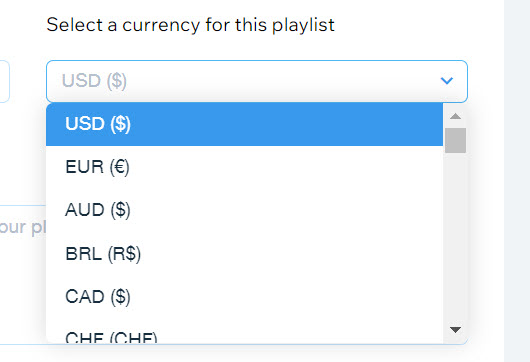
  4. Click the drop-down under Select a currency for this playlist.

  5. Select a currency.

  6. Click Save.

A screenshot of the currency selection drop-down menu.

Notes:

  • Currently, the following payment processors are not supported with Wix Music:pagueloFacil
    Isracard
    Offline.

  • For Wix Payments, there is a minimum amount of $1 per transaction. Make sure your release/track/album's price is over $1 if you're using this payment processor.

Need A Professional Website?
Contact Us 
Today!

Recommended Apps for Restaurant Owners

Recommended Apps for Photographers

Recommended Apps for Fitness Studio Owners

Recommended Scheduling Apps

Recommended eCommerce Apps

Recommended Apps to Help You Interact with Site Visitors

Deleting Apps

Updating an App from the Wix App Market

Third-Party Apps: Accessing Your Apps

Adding an App to Your Site

About the Wix App Market

Adding and Setting Up the Yelp App

Wix Apps: Adding and Setting Up the New Wix Tips

Download My App is No Longer Available

Wix Apps: Focus Timer

Wix Apps: Task List

Wix Apps: Colorblind Simulator

Wix Apps: Contrast Checker

Wix Apps: Get Image Colors

Wix Apps: Design Guides

Wix Apps: Adding and Setting Up the Wix Tips App

Displaying Your DeviantArt Content on Your Wix Site

Embedding Your Issuu Publication Code

Embedding Songkick Tour Dates on Your Wix Site

Changing the Display Options of the PDF Viewer App

Using the HubSpot App

Adding and Setting Up the HubSpot by Syncsmart.io App

Wix Apps: Adding the Download The Mobile App App to Your Site

Adding and Setting Up the Bulk Coupon Creator App

Wix Apps: Uploading 360 Images

wix experts
Graphic2Traffic web design
©
bottom of page