top of page

Sending invoices & price quotes

Wix Invoices & Price Quotes: Adding Your Items and Services

Wix Invoices and Price Quotes lets you bill customers for items or services you provide. You can add them in advance so that they’re available whenever you create an invoice or price quote, or add them while you’re creating the invoice or price quote.

Are you using Wix Stores?

These instructions are meant for items that you prefer to send separately, and don't already appear in your catalog. You can also create automated invoices for each store order you receive.

To add an item or service:

  1. Go to Invoices or Price Quotes in your site's dashboard.

  2. Click More Actions at the top right.

  3. Select Create items & services.

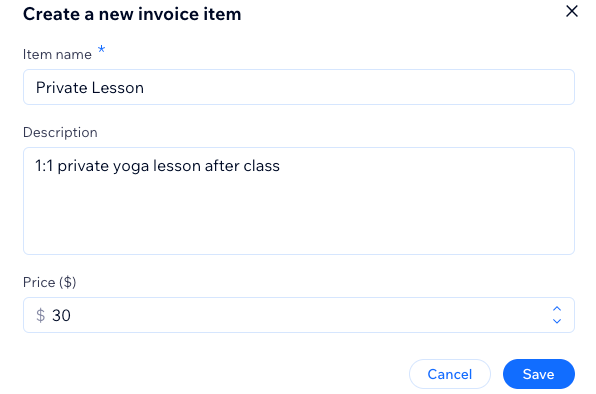
  4. Click + New Item and enter the details:Item / Service: Enter the name of the item or service.
    Description: Add a short description.
    Price: Enter the price of the item or service.

  5. Click Save.

A screenshot showing how to create an item or service to add to your future invoices.

Tip:

You can also add a new item or service while creating an invoice or price quote. Start typing in the Item or Service field and click New Item.

Want to edit or delete an item or service?

Click the Edit icon  or the Delete icon next to the item / service you want to make changes to.
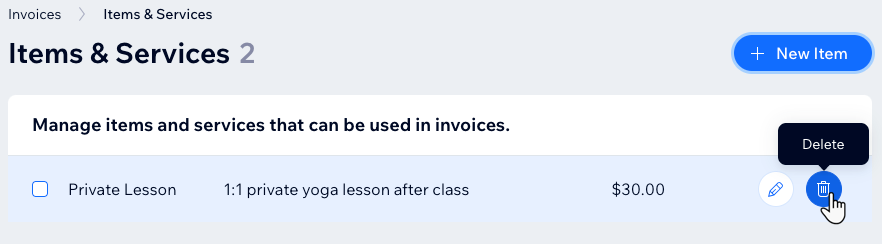
A screenshot showing how to delete an item or a service in the invoices section of the dashboard.

Need A Professional Website?
Contact Us 
Today!

Wix Automations: Adding and Sending a Coupon

Wix Automations: Sending Automated Emails to Contacts After Form Submissions

Wix Automations: Customizing Automated Emails

Wix Automations: Creating a New Automation

Wix Automations: An Overview

The New Automation Builder: Understanding Email Types

The New Automation Builder: Creating a Multi-Action Automation

The New Automation Builder: Sending Data via Webhook

The New Automation Builder: Adding and Sending a Coupon

The New Automation Builder: Troubleshooting Wix Automations

The New Automation Builder: Understanding Conditions Operators

The New Automation Builder: Setting Up a 'Scheduled Time' Trigger

The New Automation Builder: Sending Data to Google Sheets

The New Automation Builder: Using the Property Picker

The New Automation Builder: Viewing and Managing Automations Installed for You

The New Automation Builder: Customizing Automated Emails

The New Automation Builder: Managing Your Automations

The New Automation Builder: Creating an Automation

The New Automation Builder: Overview

Microsoft Office 365 Mailbox Limits

Resetting the Password for Additional Office 365 Mailboxes

Resetting Your Admin Password for Your Office 365 Mailbox

Accessing Your Microsoft Office 365 Mailbox Through Your Wix Account

Accessing Your Microsoft Office 365 Mailbox Through Your Wix Account

Accessing the Microsoft Office 365 Admin Center

Activating Your Microsoft Office 365 Mailbox Purchased from Wix

Google Workspace: Troubleshooting Login Issues

Google Workspace: FAQs

Google Workspace: Contacting Google Support

Google Workspace Error Message: "You do not have access to Email"

wix experts
Graphic2Traffic web design
©
bottom of page