top of page

Wix Forms FAQ

Wix Forms: Creating a Coupon

Coupons are a great way to give people an incentive to purchase a product or service through your form. You can offer a discount either as a percentage off the total price or as a fixed monetary amount.

You can also choose whether a coupon applies for all your forms or specific ones, such as seasonal products or services.
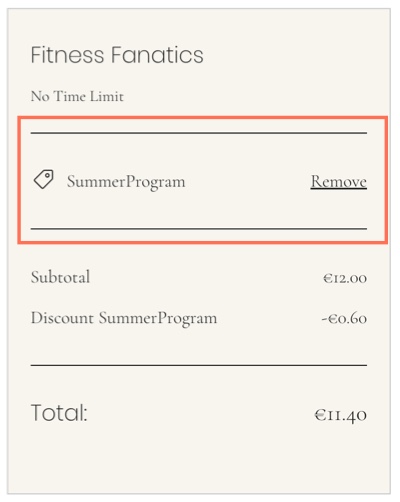
A screenshot of the applying a coupon code.

Before you begin:

Make sure to add a payment form to your site.

To create a coupon:

  1. Go to Coupons in your site's dashboard.

  2. Click New Coupon.

  3. Select the type of coupon you want to offer:$ Discount: Offer a fixed monetary discount amount.
    % Discount: Offer a percentage discount.

  4. Enter the Coupon code participants need to use the coupon.

  5. Enter the Coupon name for your own records.

  6. Enter the Discount you want to offer.

  7. Select the relevant form from the Apply to drop-down:All Forms: Participants can use the discount on all forms.
    Specific Forms: The discount is available on the forms you choose. Select the relevant form from the Form drop-down.

  8. Select the dates the coupon is valid between.

  9. (Optional) Select the Limit uses checkbox(s) to:Limit the total number of uses for this coupon: Set the number of times the coupon can be used.
    Limit to one use per customer: The same participant can't use the coupon more than once.

  10. Click Create Coupon.

Need A Professional Website?
Contact Us 
Today!

Wix Retail POS: Allowing Customers to Leave Tips

Wix Retail POS: Setting Up Text Receipts

Wix Retail POS: Allowing Customers to Redeem Loyalty Points

Wix Retail POS: Enabling Automatic Discounts

Wix Retail POS: Receiving Notifications

Wix Retail POS: Selling Physical Gift Cards

Wix Retail POS: Selling Virtual Gift Cards

Wix Retail POS: Managing Discounts

Wix Retail POS: Organizing Your Favorites Screen

Wix Retail POS: Disabling Payment Methods

Wix Retail POS: Managing Tax Collection

Wix Retail POS: About the Retail POS Plan

Wix Retail POS: Using Wix Payments as Your Payment Provider

Wix Retail POS: Troubleshooting Your Wix POS

Wix Retail POS: Using the Moneris Go Terminal Card Reader

Wix Retail POS: Connecting a Network Card Reader

Wix Retail POS: Contacting Wix Customer Care for POS Support

Wix POS Terms of Service

Wix Retail POS: Device Security Guidelines

Wix Retail POS: Troubleshooting Your Barcode Scanner

Wix Retail POS: Troubleshooting Your HP Terminal Receipt Printer

Wix Retail POS: Troubleshooting Your Cash Drawer

Wix Retail POS: Updating and Troubleshooting Your Card Reader

Wix Retail POS: Troubleshooting Your Tablet

Wix Retail POS: Updating the Tablet

Wix Retail POS: Checking the Status of Your Hardware

Wix Retail POS: Setting Up the Receipt Printer

Wix Retail POS: About Your HP Barcode Scanner

Wix Retail POS: Using the BBPOS Chipper 2X Card Reader

Wix Retail POS: Managing Your Cash Drawer

wix experts
Graphic2Traffic web design
©
bottom of page