top of page

Designing Wix Events

Wix Events: Displaying a Standalone Wix Events Button

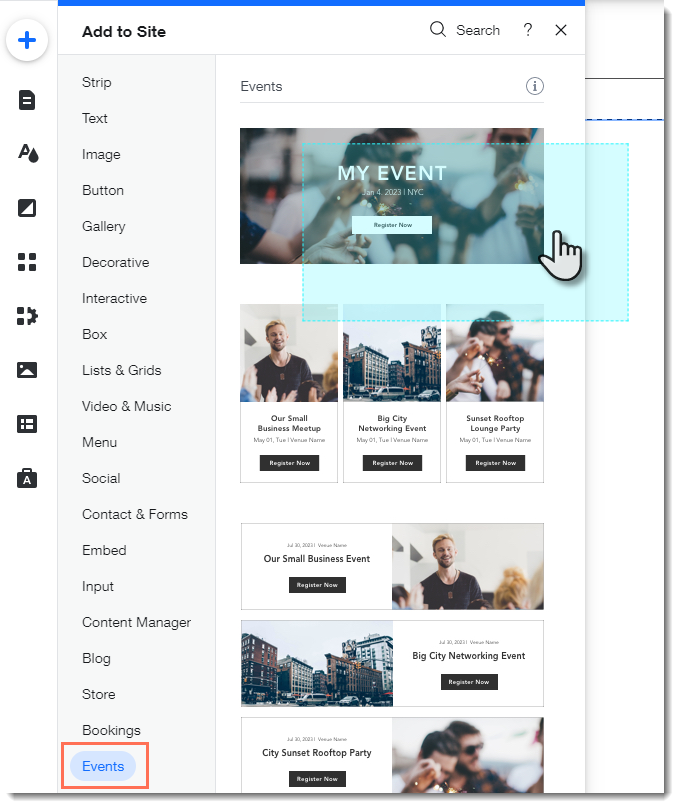
If you write about an event somewhere on your site other than the Wix Events page, you can add a standalone event button. This makes it easy for interested site visitors to book.

Note:

The standalone event button is currently not available in Editor X.

To add an event button:

  1. Click Addon the left side of the Editor.

  2. Select Events.

  3. Drag the single event display to the page.
  1. Click the Wix Events app in the Editor.

  2. Click Display Events.

  3. Under What do you want to show?, select A Single Event.

  4. Select the relevant event.

  5. Click the Layout tab.

  6. Select Button.

  7. (Optional) Edit the button:Click the Text tab to edit the button text or add a label.
    Click the Design tab to edit the look of the button.

Need A Professional Website?
Contact Us 
Today!

Wix Bookings: Blocking Off Time in Your Calendar

Wix Bookings: Managing Clients with Appointments Through your Booking Calendar

Wix Bookings: Manually Scheduling an Appointment

Wix Bookings: Rescheduling a Session

Wix Bookings: Canceling and Refunding Sessions

Wix Bookings: Refunding Clients

Wix Bookings: Adding and Setting up Waitlists

Wix Bookings: Marking Attendance for Classes

Wix Bookings: Managing the Participant List for a Course

Wix Bookings: Managing the Participant List for Your Classes

Wix Bookings: Changing the Assigned Staff Member of Scheduled Sessions

Wix Bookings: Scheduling Your Classes

Wix Bookings: About the Wix Booking Calendar

Wix Bookings: Adding and Setting up the Connecteam Integration

Wix Bookings: Adding and Setting Up the Payroll Calculator

Wix Bookings: Deleting a Staff Member

Wix Bookings: Syncing Staff Members' Personal Calendars with the Bookings Calendar

Wix Bookings: Assigning a Staff Member to an Appointment

Wix Bookings: Adding Staff Permissions

Wix Bookings: Editing Your Staff Members' Working Hours

Wix Bookings: Adding Staff Members

Wix Bookings: About Bookings Staff Members

Wix Bookings: Scheduling Recurring Appointments

Wix Bookings: Deleting a Service

Wix Bookings: Managing Services and Categories

Wix Bookings: Managing Services and Categories

Wix Bookings: Guidelines for Uploading Service Images

Wix Bookings: Allowing Clients to Book Multiple Participants for a Service

Wix Bookings: Creating View-Only Services

Wix Bookings: Making Services Unbookable

wix experts
Graphic2Traffic web design
©
bottom of page