top of page

Designing Wix Events

Wix Events: Adding a Members Area

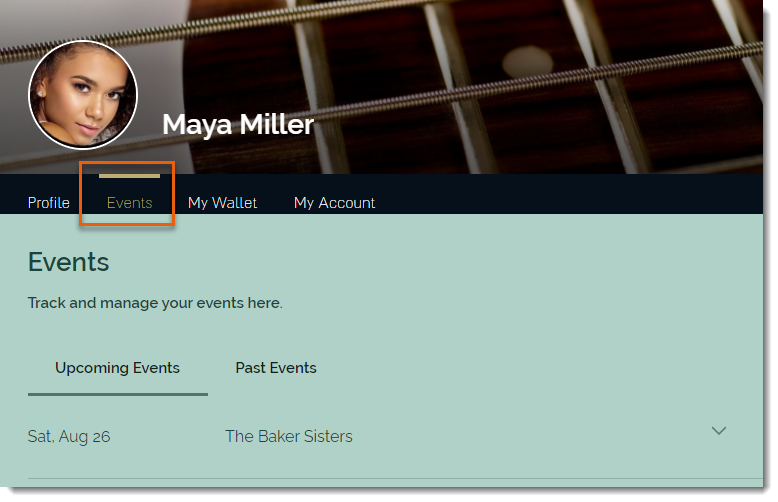
Add a Members Area to your site so guests who log in can easily access information about upcoming and past events.

Members can:

  • View complete events details

  • Download tickets (for ticketed events)

  • Save their details so they can quickly sign up for future events

  • See who else is going to an event (if enabled)

  • Share events on social media (if enabled)

  • and more

Tip:

You can limit registration for an event to site members only.

In this article, learn how to:

Adding a Members Area:

If your site doesn't have a Members Area, you can add one in just a few clicks.

Wix Editor | Show me how

  1. Click Add on the left side of the Editor.

  2. Click the Community tab.

  3. Click Members.

  4. Click Add to Site.

Editor X | Show me how

  1. Click Add Elements   at the top bar of Editor X.

  2. Click the Members tab.

  3. Click Add to Site.

Adding Wix Events to Your Members Area

If your site has an older version of the Members Area, it may not include a Wix Events section.
You can update the Members Area to add Wix Events.

To update the Members Area to include Wix Events:

  1. Click the Wix Events app in the Editor.

  2. Click the Settings icon .

  3. Click the Members tab.

  4. Click Add Now.

Need A Professional Website?
Contact Us 
Today!

Wix Automations: Adding and Sending a Coupon

Wix Automations: Sending Automated Emails to Contacts After Form Submissions

Wix Automations: Customizing Automated Emails

Wix Automations: Creating a New Automation

Wix Automations: An Overview

The New Automation Builder: Understanding Email Types

The New Automation Builder: Creating a Multi-Action Automation

The New Automation Builder: Sending Data via Webhook

The New Automation Builder: Adding and Sending a Coupon

The New Automation Builder: Troubleshooting Wix Automations

The New Automation Builder: Understanding Conditions Operators

The New Automation Builder: Setting Up a 'Scheduled Time' Trigger

The New Automation Builder: Sending Data to Google Sheets

The New Automation Builder: Using the Property Picker

The New Automation Builder: Viewing and Managing Automations Installed for You

The New Automation Builder: Customizing Automated Emails

The New Automation Builder: Managing Your Automations

The New Automation Builder: Creating an Automation

The New Automation Builder: Overview

Microsoft Office 365 Mailbox Limits

Resetting the Password for Additional Office 365 Mailboxes

Resetting Your Admin Password for Your Office 365 Mailbox

Accessing Your Microsoft Office 365 Mailbox Through Your Wix Account

Accessing Your Microsoft Office 365 Mailbox Through Your Wix Account

Accessing the Microsoft Office 365 Admin Center

Activating Your Microsoft Office 365 Mailbox Purchased from Wix

Google Workspace: Troubleshooting Login Issues

Google Workspace: FAQs

Google Workspace: Contacting Google Support

Google Workspace Error Message: "You do not have access to Email"

wix experts
Graphic2Traffic web design
©
bottom of page