top of page

Wix Chat FAQ

Wix Chat: Customizing the Chat Icon on Your Mobile Site

When you install Wix Chat, it automatically adds a Quick Action Bar (QAB) to your mobile site. With a QAB, visitors can easily start chatting with you from their mobile phones as well as perform any other shortcuts you've added.
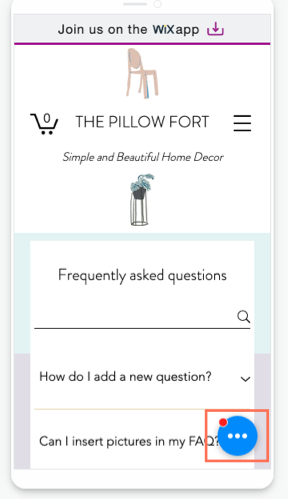
Depending on the number of actions in the QAB, the customization options differ. If chat is your only action, the design is pulled from your desktop site. If you have multiple actions, you can choose a design from the preset QAB themes.

Want to remove the chat icon completely?

You cannot remove Wix Chat from your mobile site without removing it from your desktop site. To remove the chat function entirely from both desktop and mobile, delete Wix Chat.

Vote for the ability to remove chat from mobile only in this feature request.

Customizing the chat icon when Wix Chat is the only action in the QAB

If Wix Chat is the only action in your QAB, the color of the mobile chat icon is pulled from the Design tab in your desktop chat settings. To change the color of the icon, go to your Editor from desktop and update the Minimized Chat settings. Learn more about customizing this and other aspects of your chatbox

Note:

The chat icon color is the same for desktop and mobile.

Customizing the chat icon when there are multiple actions in the QAB

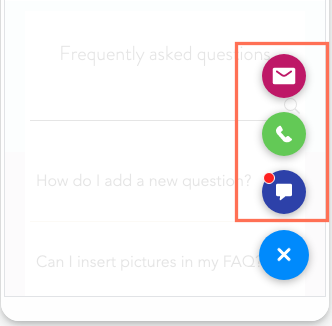
If your QAB has multiple actions, your design options for the chat icon are limited to the QAB preset designs. By default, the chat icon is blue. You can change the color scheme of the icons and customize the border and shadow of the QAB from the mobile Editor. Learn more about designing your QAB
Need A Professional Website?
Contact Us 
Today!

Google Workspace: Purchasing and Setting up a Business Email

Resolving Email Issues

Changing the Priority of Your MX Records

Connecting Email Purchased Outside of Wix

Google Workspace: Adding a DKIM Record to your Business Email

Google Workspace: Adding an SPF Record to your Business Email

Adding a DKIM (TXT) Record

Adding or Updating SPF Records in Your Wix Account

Business Email: General Troubleshooting

Connecting Email Accounts from Different Email Providers for the Same Domain

Increasing Email Deliverability of Emails Sent from Your Business Email

Top Reasons for Using a Personalized Business Email

Business Email: An Overview

Wix Pay Links: Creating and Managing Pay Links in the Wix App

Wix Pay Links: Creating and Managing Pay Links

Wix Proposals: Managing Your Proposals on the Wix App

Wix Proposals by Prospero: Saving and Managing Proposal Templates

Wix Proposals by Prospero: Adding and Setting up Proposals

Wix Price Quotes: Managing Your Price Quotes in the Wix App

Wix Invoices & Price Quotes: Adding Default Notes

Wix Invoices & Price Quotes: Managing Your Settings

Wix Invoices & Price Quotes: Searching, Filtering, and Sorting

Wix Invoices & Price Quotes: Changing Your Initial Document Number

Wix Invoices & Price Quotes: Adding Tax Types

Wix Invoices & Price Quotes: Adding Your Items and Services

Wix Invoices & Price Quotes: Changing Your Currency and Payment Terms

Wix Invoices & Price Quotes: Adding Your Business Info

Wix Invoices: Managing Your Invoices

Wix Invoices: Creating and Managing Recurring Invoices

Wix Invoices: Creating and Managing Recurring Invoices

wix experts
Graphic2Traffic web design
©
bottom of page