top of page

Wix Bookings

Wix Bookings: Setting Default Work Hours

Add your default hours so clients know when you're available for appointments. These hours apply to all new staff members automatically.

Your default work hours determine availability for clients to book appointments online. Default hours don’t affect availability of classes and courses, when you create those types of services, you set the hours separately.
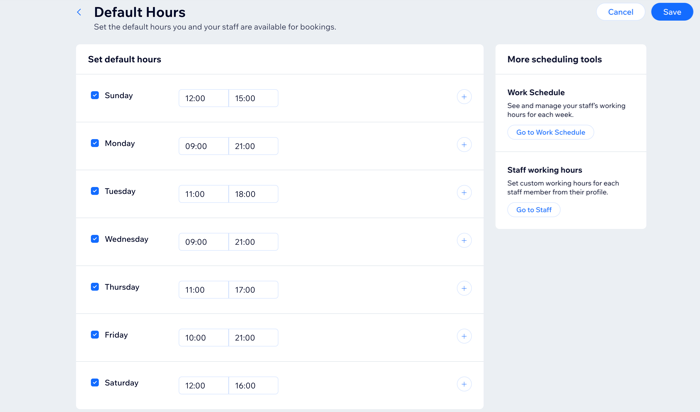
Screenshot showing the Default Hours section of the dashboard.

Note:

You can customize staff hours manually if they offer services outside of your default hours or if they change their shifts. You can also set start and end dates for a staff member's custom work hours, which is useful for holiday overtime or maternity cover, for example.

To set default hours for your business:

  1. Go to Default Hours in your site's dashboard.

  2. Select the checkboxes next to the days your business is open.

  3. Enter a start and end time for the first day. (e.g. 9:00 AM - 1:00 PM).

  4. (Optional) Add an additional time period for the same day:Click the add hours  icon.
    Enter a start and end time. (e.g. 4:00 PM - 7:00 PM).

  5. Repeat for all other work days.

  6. Click Save.

Need A Professional Website?
Contact Us 
Today!

Wix Chat: Automatically Sending Chat Messages or Responding to Chat Messages

Wix Chat: About Notifications

Wix Chat: Deleting Wix Chat

Wix Chat: Adding the WhatsApp Channel to Your Chatbox

Wix Chat: Viewing and Chatting with Live Site Visitors

Wix Chat: Customizing the Chat Icon on Your Mobile Site

Wix Chat: Translating Wix Chat

Wix Chat: Allowing Members to Chat with Each Other Using Members Chat

Wix Chat: Customizing Your Chat Settings

Wix Chat: Designing Your Chatbox

Wix Chat: Adding Wix Chat to Your Site

Wix Chat: An Overview

Your AI Site-Chat Conversations Quota

Designing and Customizing Wix AI Site-Chat

Training Your AI Site-Chat

Testing Your Wix AI Site-Chat

Adding and Setting Up Wix AI Site-Chat

About Wix AI Site-Chat

Wix Inbox: Sending a Broadcast Message to Your Contacts in the Wix App

Wix Inbox: Working with Site Collaborators

Wix Inbox: Connecting WhatsApp Business to Inbox

Wix Inbox: Connecting Your Facebook Page

Wix Inbox: Connecting Instagram to Inbox

Wix Inbox: About Wix Inbox Channels

Wix Inbox: Connecting Your Gmail Account

Wix Inbox: Managing Your Notification Settings

Wix Inbox: Managing Your Inbox

Wix Inbox: Setting Up Your Inbox Profile and Outgoing Emails

Wix Inbox: Sending Messages and Attaching Items

Wix Inbox: An Overview

wix experts
Graphic2Traffic web design
©
bottom of page