top of page

Emails, SMS, and promotions

Wix Bookings: Managing Email Notifications You Receive

When one of your clients books or cancels a service, Wix emails you, your client and the staff member providing the service.

Notes:

  • You do not receive email notifications for bookings made in preview mode while you're working on your site.

  • If you're using a merchant account (e.g. PayPal, Stripe, Authorize.net), the email notification goes to the email address associated with that account.
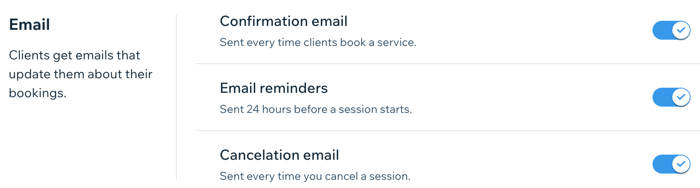
A screenshot showing the email settings section of the dashboard for Wix Bookings.

In this article, learn more about:

Activating email notifications for new bookings

Make sure you never miss a new booking by activating email notifications in the Booking settings section of the dashboard.

Note:

Notification emails for you and your staff go to the addresses in the Business Info and Staff tabs in the dashboard. Make these email addresses are up-to-date, so you and your staff receive the relevant client emails.

To activate email notifications for new bookings:

  1. Go to the Booking Settings tab.

  2. Click Emails & SMS reminders.

  3. Enable the toggle next to New booking emails.
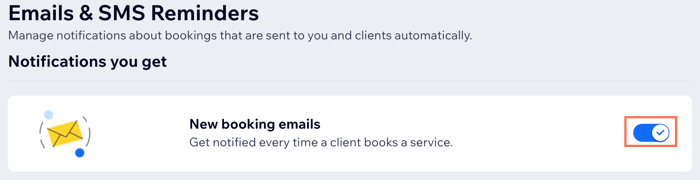
A screenshot showing how to activate email notifications for new bookings received.

Disabling email notifications for your staff

Your staff may not need to receive email notifications about their upcoming bookings. For example, if you have an administrator who handles all bookings for your staff. You can disable your staff members' email notifications from the Staff tab in the dashboard.

Important:

If you delete their email from the Staff tab, your staff member won't receive any email notifications for new bookings, rescheduled sessions or cancellations.

To disable email notifications for your staff:

  1. Go to Staff in your site's dashboard.

  2. Hover over the relevant staff member and click Edit.

  3. Delete their email address from the Email field.

  4. Click Save.

  5. Repeat steps 2 - 4 for all relevant staff members.
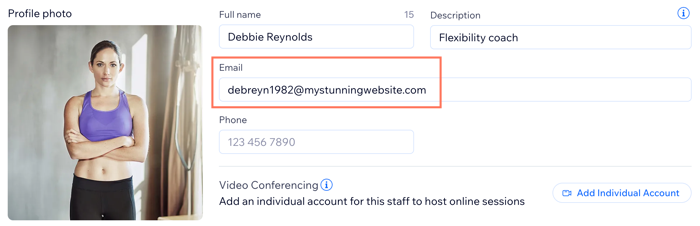
Screenshot showing how to remove a staff member's email address so they no longer receive bookings notification emails.

Need A Professional Website?
Contact Us 
Today!

Wix Retail POS: Allowing Customers to Leave Tips

Wix Retail POS: Setting Up Text Receipts

Wix Retail POS: Allowing Customers to Redeem Loyalty Points

Wix Retail POS: Enabling Automatic Discounts

Wix Retail POS: Receiving Notifications

Wix Retail POS: Selling Physical Gift Cards

Wix Retail POS: Selling Virtual Gift Cards

Wix Retail POS: Managing Discounts

Wix Retail POS: Organizing Your Favorites Screen

Wix Retail POS: Disabling Payment Methods

Wix Retail POS: Managing Tax Collection

Wix Retail POS: About the Retail POS Plan

Wix Retail POS: Using Wix Payments as Your Payment Provider

Wix Retail POS: Troubleshooting Your Wix POS

Wix Retail POS: Using the Moneris Go Terminal Card Reader

Wix Retail POS: Connecting a Network Card Reader

Wix Retail POS: Contacting Wix Customer Care for POS Support

Wix POS Terms of Service

Wix Retail POS: Device Security Guidelines

Wix Retail POS: Troubleshooting Your Barcode Scanner

Wix Retail POS: Troubleshooting Your HP Terminal Receipt Printer

Wix Retail POS: Troubleshooting Your Cash Drawer

Wix Retail POS: Updating and Troubleshooting Your Card Reader

Wix Retail POS: Troubleshooting Your Tablet

Wix Retail POS: Updating the Tablet

Wix Retail POS: Checking the Status of Your Hardware

Wix Retail POS: Setting Up the Receipt Printer

Wix Retail POS: About Your HP Barcode Scanner

Wix Retail POS: Using the BBPOS Chipper 2X Card Reader

Wix Retail POS: Managing Your Cash Drawer

wix experts
Graphic2Traffic web design
©
bottom of page