top of page

Managing your staff

Wix Bookings: About Bookings Staff Members

Add your staff to your site so they can provide services to clients and help manage your business. You can control each staff member's level of access to your site and business information.

The staff tab in the dashboard, showing staff members' details

Managing staff hours

Staff hours determine when a staff member is available to provide appointments. To manage your business hours, Wix Bookings offers a two-level system.

First, set your default work hours which apply to all staff. Then you can set individual staff members' hours to offer a more flexible service to clients.

A screenshot showing the various working hours for a single staff member during one week.

Inviting staff members to sync their Google calendars

To help staff members keep track of their schedule, you can invite them to sync their personal calendars with their Wix Bookings calendar. This helps prevent double bookings and allows staff to see their complete upcoming schedule in one place.

Make sure you assign the relevant permission level, so your staff member can sync their personal calendar (see section below).

A screenshot showing how to give a staff member the necessary permissions before they can sync their personal calendar.

Assigning permission levels

Wix Bookings allows you to assign different levels of permissions to your staff and others who help build and manage your site.

For example, adding someone as a Bookings staff member gives them permission to book their own clients, access their personal calendar and manage their sessions.

You may also want to invite non-staff members to contribute on your site. For example, if you hire a graphic designer or a copywriter to make changes to your site.

Note:

Only Bookings Admins have permission to send payment requests and charge credit cards.
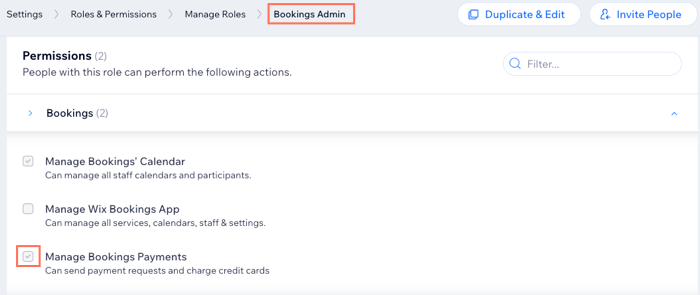
A screenshot showing the permissions a Bookings Admin has on your site.

Need A Professional Website?
Contact Us 
Today!

Google Workspace: Purchasing and Setting up a Business Email

Resolving Email Issues

Changing the Priority of Your MX Records

Connecting Email Purchased Outside of Wix

Google Workspace: Adding a DKIM Record to your Business Email

Google Workspace: Adding an SPF Record to your Business Email

Adding a DKIM (TXT) Record

Adding or Updating SPF Records in Your Wix Account

Business Email: General Troubleshooting

Connecting Email Accounts from Different Email Providers for the Same Domain

Increasing Email Deliverability of Emails Sent from Your Business Email

Top Reasons for Using a Personalized Business Email

Business Email: An Overview

Wix Pay Links: Creating and Managing Pay Links in the Wix App

Wix Pay Links: Creating and Managing Pay Links

Wix Proposals: Managing Your Proposals on the Wix App

Wix Proposals by Prospero: Saving and Managing Proposal Templates

Wix Proposals by Prospero: Adding and Setting up Proposals

Wix Price Quotes: Managing Your Price Quotes in the Wix App

Wix Invoices & Price Quotes: Adding Default Notes

Wix Invoices & Price Quotes: Managing Your Settings

Wix Invoices & Price Quotes: Searching, Filtering, and Sorting

Wix Invoices & Price Quotes: Changing Your Initial Document Number

Wix Invoices & Price Quotes: Adding Tax Types

Wix Invoices & Price Quotes: Adding Your Items and Services

Wix Invoices & Price Quotes: Changing Your Currency and Payment Terms

Wix Invoices & Price Quotes: Adding Your Business Info

Wix Invoices: Managing Your Invoices

Wix Invoices: Creating and Managing Recurring Invoices

Wix Invoices: Creating and Managing Recurring Invoices

wix experts
Graphic2Traffic web design
©
bottom of page