top of page

Setting rates & payments

Setting a Weekly or Monthly Rate in Wix Hotels

Important:

This article refers to the original Wix Hotels. If you are using the new Wix Hotels by HotelRunner, which is not yet available to all users, please read the information here. Learn how to check which version of Wix Hotels you are using.

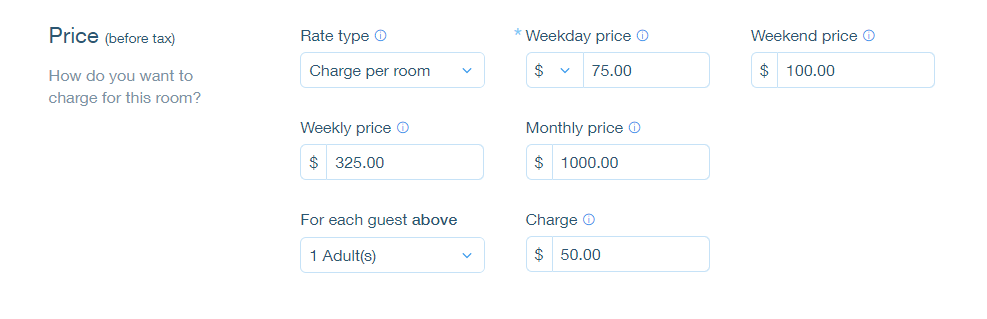
The weekly rate is the rate a guest pays when booking for 7 nights. The monthly rate is the rate a guest pays when booking for 28 nights. Wix Hotels allows you to set the rate at which you want to charge your an individual unit.

To set weekly or monthly rates:

  1. Go to your dashboard.

  2. Click the Hotels tab.

  3. Click the Rooms tab.

  4. Click the Edit icon for an existing room or click Create New to add a new one.

  5. Scroll down to the Price section.

  6. Click More Pricing Options.

  7. Enter the weekly and/or monthly price.

  8. Click Save.

Tip:

  • If a guest books for 8 nights, the rate is calculated as the weekly rate + the daily or weekend rate.

  • If a guest books for 29 nights, the rate is calculated as the monthly rate + the daily or weekend rate.

Need A Professional Website?
Contact Us 
Today!

Wix Bookings: Blocking Off Time in Your Calendar

Wix Bookings: Managing Clients with Appointments Through your Booking Calendar

Wix Bookings: Manually Scheduling an Appointment

Wix Bookings: Rescheduling a Session

Wix Bookings: Canceling and Refunding Sessions

Wix Bookings: Refunding Clients

Wix Bookings: Adding and Setting up Waitlists

Wix Bookings: Marking Attendance for Classes

Wix Bookings: Managing the Participant List for a Course

Wix Bookings: Managing the Participant List for Your Classes

Wix Bookings: Changing the Assigned Staff Member of Scheduled Sessions

Wix Bookings: Scheduling Your Classes

Wix Bookings: About the Wix Booking Calendar

Wix Bookings: Adding and Setting up the Connecteam Integration

Wix Bookings: Adding and Setting Up the Payroll Calculator

Wix Bookings: Deleting a Staff Member

Wix Bookings: Syncing Staff Members' Personal Calendars with the Bookings Calendar

Wix Bookings: Assigning a Staff Member to an Appointment

Wix Bookings: Adding Staff Permissions

Wix Bookings: Editing Your Staff Members' Working Hours

Wix Bookings: Adding Staff Members

Wix Bookings: About Bookings Staff Members

Wix Bookings: Scheduling Recurring Appointments

Wix Bookings: Deleting a Service

Wix Bookings: Managing Services and Categories

Wix Bookings: Managing Services and Categories

Wix Bookings: Guidelines for Uploading Service Images

Wix Bookings: Allowing Clients to Book Multiple Participants for a Service

Wix Bookings: Creating View-Only Services

Wix Bookings: Making Services Unbookable

wix experts
Graphic2Traffic web design
©
bottom of page