top of page

Setting up Pricing Plans

Pricing Plans: Allowing Guest Checkout on Your Site

Let visitors to your site buy your pricing plans without having to sign up or log in. Enabling guest checkout makes it easier for site visitors to become loyal customers.

In this article, learn more about:

Enabling guest checkout for pricing plans

Enable guest checkout to let visitors sample your pricing plans, without becoming full members of your site right away.

Visitors who go through guest checkout automatically become contacts. They also receive an email with a link to create a member profile on your site, so they can access the Members Area.

Notes:

  • For plans that include online content and services, visitors need to create their member profile up to gain access.

  • Guest checkout is only available to customers on the Plans & Pricing page on your site.

To enable guest checkout:

  1. Go to Pricing Plans Settings in your site's dashboard.

  2. Click the Checkout tab.

  3. Click to enable the Guest checkout toggle.
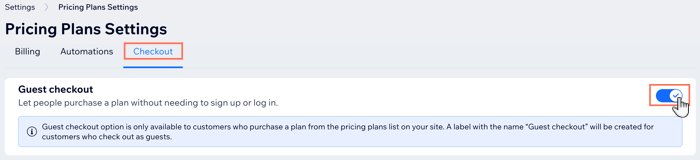
A screenshot of the pricing plans settings page where you can enable guest checkout

How guest checkout looks on your site

After you enable guest checkout, site visitors can buy your plans without signing up to become a site member. They begin by choosing the plan they want to buy. Then, they have the option of logging in or continuing as a guest.
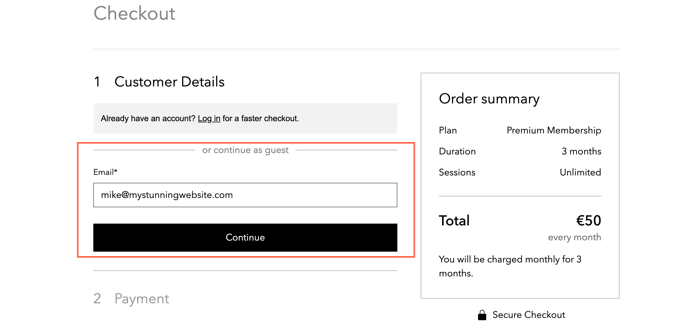
A screenshot of purchasing a pricing plan as a guest, without signing up as members

Visitors then enter their payment details as normal and continue.
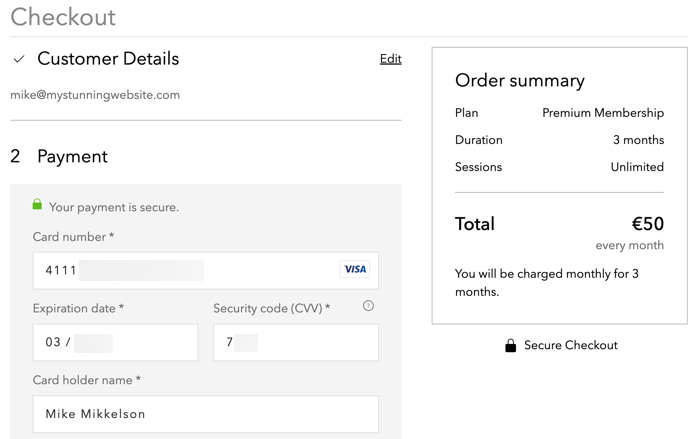
A screenshot of the checkout process when paying as a guest

When payment is complete, they receive an email with the details of their purchase. The email contains a link which allows your customers to Create New Password and sign up as members of your site.

Note:

You are unable to customize this email.
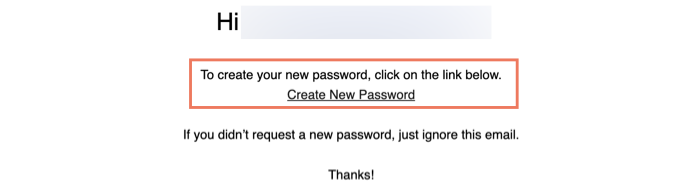
A screenshot showing the email sent to customers after they complete guest checkout, encouraging them to sign up to your site

What's next?

Need A Professional Website?
Contact Us 
Today!

Wix Retail POS: Allowing Customers to Leave Tips

Wix Retail POS: Setting Up Text Receipts

Wix Retail POS: Allowing Customers to Redeem Loyalty Points

Wix Retail POS: Enabling Automatic Discounts

Wix Retail POS: Receiving Notifications

Wix Retail POS: Selling Physical Gift Cards

Wix Retail POS: Selling Virtual Gift Cards

Wix Retail POS: Managing Discounts

Wix Retail POS: Organizing Your Favorites Screen

Wix Retail POS: Disabling Payment Methods

Wix Retail POS: Managing Tax Collection

Wix Retail POS: About the Retail POS Plan

Wix Retail POS: Using Wix Payments as Your Payment Provider

Wix Retail POS: Troubleshooting Your Wix POS

Wix Retail POS: Using the Moneris Go Terminal Card Reader

Wix Retail POS: Connecting a Network Card Reader

Wix Retail POS: Contacting Wix Customer Care for POS Support

Wix POS Terms of Service

Wix Retail POS: Device Security Guidelines

Wix Retail POS: Troubleshooting Your Barcode Scanner

Wix Retail POS: Troubleshooting Your HP Terminal Receipt Printer

Wix Retail POS: Troubleshooting Your Cash Drawer

Wix Retail POS: Updating and Troubleshooting Your Card Reader

Wix Retail POS: Troubleshooting Your Tablet

Wix Retail POS: Updating the Tablet

Wix Retail POS: Checking the Status of Your Hardware

Wix Retail POS: Setting Up the Receipt Printer

Wix Retail POS: About Your HP Barcode Scanner

Wix Retail POS: Using the BBPOS Chipper 2X Card Reader

Wix Retail POS: Managing Your Cash Drawer

wix experts
Graphic2Traffic web design
©
bottom of page