


Using the Wix app for Online Programs
Online Programs: Connecting a Group to Your Program in the Wix App
Connect a group to your program using the Wix app. This gives participants a place to discuss their progress and share updates to motivate each other to complete the program. You can connect an existing group or create a new one straight from the app.
To connect a group to your program in the Wix app:
Go to your site in the Wix app.
Tap Manage
 at the bottom.
Tap Online Programs.
Tap the More Actions icon
 next to the relevant program.
Tap the Edit.
Scroll down to Group and tap Connect a Group.
Choose what you want to do:Connect an existing group to the program: Select a group from the list and tap Done.
Note: Once a group is linked to the program, anyone who joins your program automatically joins the group.
Create a new group for the program:Tap Create New Group.
Enter the group details including the name, cover image, and privacy setting. Learn more about creating a group using the Wix app.
Tap Done.
(Optional) Enable the Share Progress toggle to allow participants to share their progress to the group when they complete steps.
Tap Save.
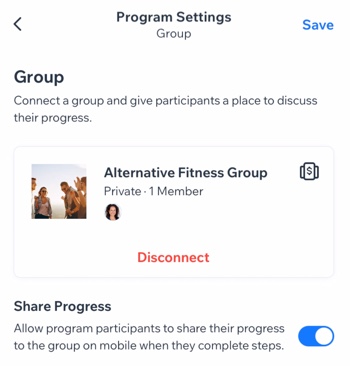
Want to disconnect the group?
If the group is no longer relevant to your program (e.g. the program has ended or you want to add different one), you can remove the group from your program. Tap Disconnect under the group.