top of page

Setting up sales tax

Including Tax in the Product Price

Important:

This tax solution is currently available for Wix Stores, Wix Bookings, and Wix Restaurants Orders (New) & Wix Table Reservations. Using a different app? Click an option below:

In some countries, merchants are obligated to display prices with the tax included. In other countries, such as the US and Canada, product prices are displayed without tax. The sales tax is added later during checkout.

Important:

Check local regulations in your country on how tax should be displayed in your store.

To set whether tax is included in the product price:

  1. Go to tax in your site's dashboard.

  2. Scroll down to the Tax Settings section.
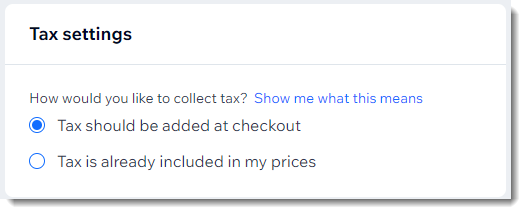
Screenshot of the part of the tax page where you select if tax is added to prices or only at checkout

  1. Select an option:Add tax at checkout: When buying an item that costs $100, customers see a total of $110 during checkout:
    Include tax in item price: Tax amount is subtracted from the total price. When buying an item that costs $100, customers see a total of $100 during checkout, with the sales tax listed separately.

Notes:

  • To calculate sales tax, you can use this tool. Make sure to specify if tax (VAT) is added at checkout or excluded.

  • Did you create shipping rules or coupons based on price (e.g. free shipping on sales over $100)? Note that the price without tax is used for these calculations (e.g. $90.91 in the example above).

Need A Professional Website?
Contact Us 
Today!

Wix Automations: Adding and Sending a Coupon

Wix Automations: Sending Automated Emails to Contacts After Form Submissions

Wix Automations: Customizing Automated Emails

Wix Automations: Creating a New Automation

Wix Automations: An Overview

The New Automation Builder: Understanding Email Types

The New Automation Builder: Creating a Multi-Action Automation

The New Automation Builder: Sending Data via Webhook

The New Automation Builder: Adding and Sending a Coupon

The New Automation Builder: Troubleshooting Wix Automations

The New Automation Builder: Understanding Conditions Operators

The New Automation Builder: Setting Up a 'Scheduled Time' Trigger

The New Automation Builder: Sending Data to Google Sheets

The New Automation Builder: Using the Property Picker

The New Automation Builder: Viewing and Managing Automations Installed for You

The New Automation Builder: Customizing Automated Emails

The New Automation Builder: Managing Your Automations

The New Automation Builder: Creating an Automation

The New Automation Builder: Overview

Microsoft Office 365 Mailbox Limits

Resetting the Password for Additional Office 365 Mailboxes

Resetting Your Admin Password for Your Office 365 Mailbox

Accessing Your Microsoft Office 365 Mailbox Through Your Wix Account

Accessing Your Microsoft Office 365 Mailbox Through Your Wix Account

Accessing the Microsoft Office 365 Admin Center

Activating Your Microsoft Office 365 Mailbox Purchased from Wix

Google Workspace: Troubleshooting Login Issues

Google Workspace: FAQs

Google Workspace: Contacting Google Support

Google Workspace Error Message: "You do not have access to Email"

wix experts
Graphic2Traffic web design
©
bottom of page