


Connecting external services
Importing Reservations from an External Calendar (iCal) to Wix Hotels
Important:
This article refers to the original Wix Hotels. If you are using the new Wix Hotels by HotelRunner, which is not yet available to all users, please read the information here. Learn how to check which version of Wix Hotels you are using.
Import your reservations from popular external services including Airbnb, HomeAway, and VRBO to your Wix Hotels reservation calendar.
Once you import your calendar, your Wix Hotels reservation calendar stays up to date.
Notes:
You can only import from services that allow you to export your calendar in iCal format.
The sync is one way only, from iCal to the Wix Calendar.
Imported rates do not appear in the calendar. Rates can be viewed by clicking on the reservation in the calendar and scrolling down to the Payment Details section.
This feature is not compatible with the Wix Hotels Channel Manager. If you want to connect the Channel Manager please delete all the URLs in this tab before doing so.
To import your external calendar:
Click the Hotels tab.
Click to expand the Reservations tab.
Select iCal.
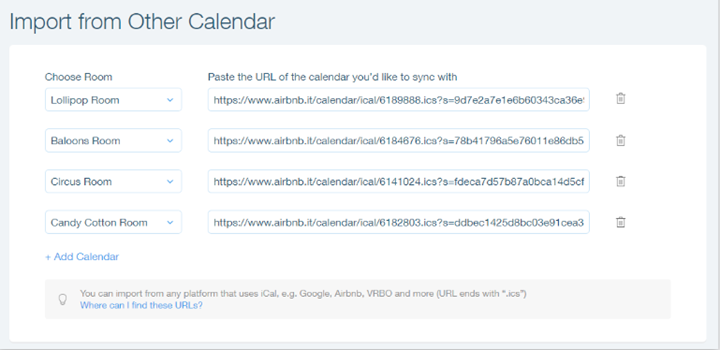
Click the Choose Type drop-down menu and select a room type.
Paste your iCal URL into the URL field.
(Optional) Click Add Calendar to add another room type and paste the iCal URL in the URL field.
Click Save.
Important:
If you have multiple room types, you must add a different iCal URL for each room type.
If you are having trouble importing your calendar, please contact us and prepare the following information:
Your iCal URL
A screenshot of the original calendar showing the reservations that do not show on your Wix Hotels calendar