top of page

Additional Wix Apps

Embedding Songkick Tour Dates on Your Wix Site

Embed your tour dates from Songkick to your Wix site, by copying the embed code and pasting it in your editor.

Before you begin:

Your account needs to be set up as the manager of the requested artist.

A screenshot of the Songkick landing page.

To embed tour dates:

  1. Log in to Songkick.

  2. Go to the tour dates portal.

  3. Customize the options in the panel on the right.
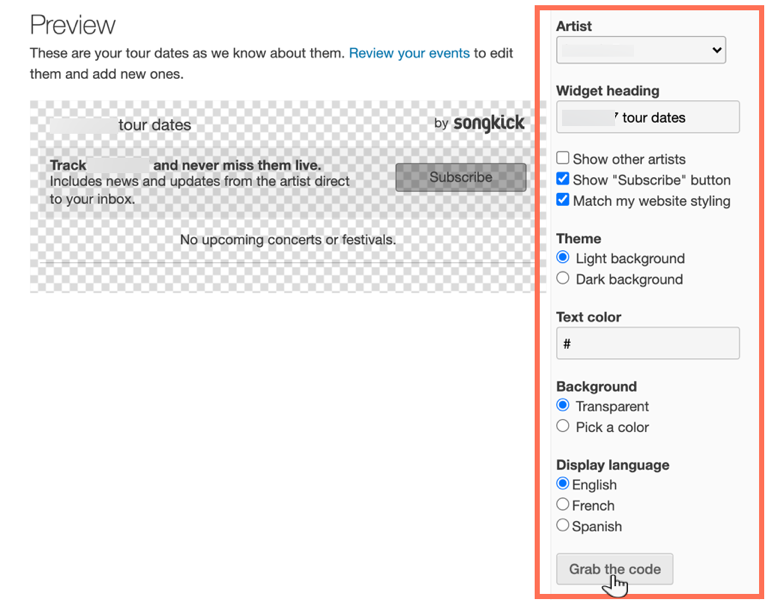
A screenshot of the tour dates widget in Songkick, showing the options to customize.

  1. Click Grab the code.

  2. Go to your Wix Editor.

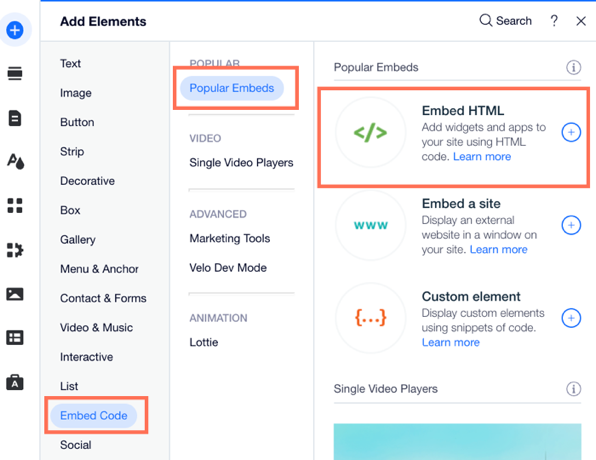
  3. Click Add Elements  on the left side of the Editor.

  4. Click Embed Code.

  5. Click Embed HTML.

A screenshot of the the Add Elements panel showing the option to Embed HTML.

  1. Paste the code you copied from step 4 into the Add your code here (HTTPS only) field.

  2. Click Update.

  3. (Optional) Enter alt text that describes what you're embedding in the What's in the embed? Tell Google field.

  4. When ready, publish your site.

Need A Professional Website?
Contact Us 
Today!

Wix Retail POS: Allowing Customers to Leave Tips

Wix Retail POS: Setting Up Text Receipts

Wix Retail POS: Allowing Customers to Redeem Loyalty Points

Wix Retail POS: Enabling Automatic Discounts

Wix Retail POS: Receiving Notifications

Wix Retail POS: Selling Physical Gift Cards

Wix Retail POS: Selling Virtual Gift Cards

Wix Retail POS: Managing Discounts

Wix Retail POS: Organizing Your Favorites Screen

Wix Retail POS: Disabling Payment Methods

Wix Retail POS: Managing Tax Collection

Wix Retail POS: About the Retail POS Plan

Wix Retail POS: Using Wix Payments as Your Payment Provider

Wix Retail POS: Troubleshooting Your Wix POS

Wix Retail POS: Using the Moneris Go Terminal Card Reader

Wix Retail POS: Connecting a Network Card Reader

Wix Retail POS: Contacting Wix Customer Care for POS Support

Wix POS Terms of Service

Wix Retail POS: Device Security Guidelines

Wix Retail POS: Troubleshooting Your Barcode Scanner

Wix Retail POS: Troubleshooting Your HP Terminal Receipt Printer

Wix Retail POS: Troubleshooting Your Cash Drawer

Wix Retail POS: Updating and Troubleshooting Your Card Reader

Wix Retail POS: Troubleshooting Your Tablet

Wix Retail POS: Updating the Tablet

Wix Retail POS: Checking the Status of Your Hardware

Wix Retail POS: Setting Up the Receipt Printer

Wix Retail POS: About Your HP Barcode Scanner

Wix Retail POS: Using the BBPOS Chipper 2X Card Reader

Wix Retail POS: Managing Your Cash Drawer

wix experts
Graphic2Traffic web design
©
bottom of page