top of page

Check-in by Wix for Events

Check-in by Wix: Receiving Push Notifications on Your Mobile Device

Customize your preferences and receive push notifications tailored to your event needs. Whether it's guest RSVPs, ticket orders, or expert event management tips, you can manage your notifications to stay informed every step of the way.

To enable or disable push notifications:

  1. Open the Check-in by Wix app.

  2. Tap the Profile icon  at the top.

  3. Tap Notification settings.

  4. (If you have multiple sites) Choose the relevant site.

  5. Tap the Allow Push Notifications toggle to enable or disable the relevant notifications:Enabled: Choose the notifications you want to receive by enabling the specific toggles. 
    If you're disabling a notification, choose how long you want to mute notifications for.
    Disabled: All notifications are disabled. Choose how long you want to mute the notifications for.
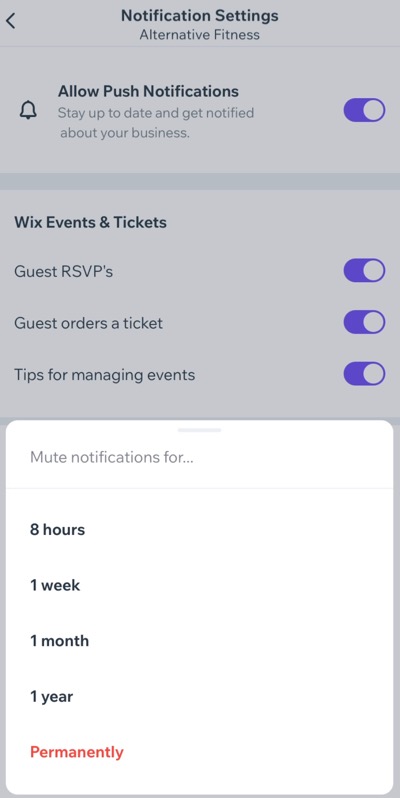
Choosing how long to mute notifications for in the Check-in by Wix app

Need A Professional Website?
Contact Us 
Today!

Wix Retail POS: Allowing Customers to Leave Tips

Wix Retail POS: Setting Up Text Receipts

Wix Retail POS: Allowing Customers to Redeem Loyalty Points

Wix Retail POS: Enabling Automatic Discounts

Wix Retail POS: Receiving Notifications

Wix Retail POS: Selling Physical Gift Cards

Wix Retail POS: Selling Virtual Gift Cards

Wix Retail POS: Managing Discounts

Wix Retail POS: Organizing Your Favorites Screen

Wix Retail POS: Disabling Payment Methods

Wix Retail POS: Managing Tax Collection

Wix Retail POS: About the Retail POS Plan

Wix Retail POS: Using Wix Payments as Your Payment Provider

Wix Retail POS: Troubleshooting Your Wix POS

Wix Retail POS: Using the Moneris Go Terminal Card Reader

Wix Retail POS: Connecting a Network Card Reader

Wix Retail POS: Contacting Wix Customer Care for POS Support

Wix POS Terms of Service

Wix Retail POS: Device Security Guidelines

Wix Retail POS: Troubleshooting Your Barcode Scanner

Wix Retail POS: Troubleshooting Your HP Terminal Receipt Printer

Wix Retail POS: Troubleshooting Your Cash Drawer

Wix Retail POS: Updating and Troubleshooting Your Card Reader

Wix Retail POS: Troubleshooting Your Tablet

Wix Retail POS: Updating the Tablet

Wix Retail POS: Checking the Status of Your Hardware

Wix Retail POS: Setting Up the Receipt Printer

Wix Retail POS: About Your HP Barcode Scanner

Wix Retail POS: Using the BBPOS Chipper 2X Card Reader

Wix Retail POS: Managing Your Cash Drawer

wix experts
Graphic2Traffic web design
©
bottom of page