top of page

Setting up Wix Hotels

Adding Your Hotels Policies

Important:

This article refers to the original Wix Hotels. If you are using the new Wix Hotels by HotelRunner, which is not yet available to all users, please read the information here. Learn how to check which version of Wix Hotels you are using.

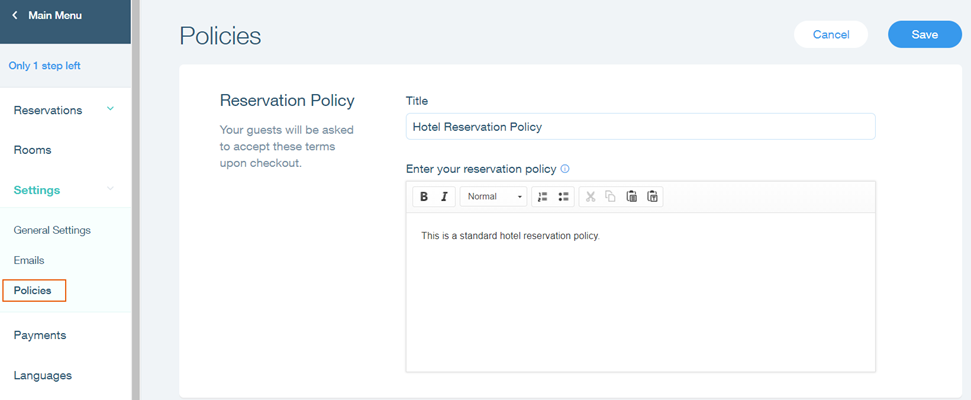
Add clear and concise hotel policies so your guests can book with confidence. With Wix Hotels, you can add 2 policies:

  • A reservation policy: This is your hotel's general reservation policy. It usually includes information about payment terms, check-in and check-out times, and anything else you want guests to know.

  • A cancellation policy: This policy should include anything you want guests to know about cancellation; how long in advance they need to cancel to receive a full refund, how much they need to pay if they cancel last minute etc.

To add your hotel policies:

  1. Go to your site's dashboard.

  2. Click the Hotels tab on the left.

  3. Click the Settings tab.

  4. Click Policies.

  5. Add your reservation and cancellation policies.
    Tip: Use the text editing toolbar to change the font, formatting and alignment of your policy text.

  6. Click Save.

Tip:

Follow the guidelines below when creating your policies:

  • Keep the policy clear and concise.

  • Use simple language and avoid jargon.

  • Do not use abbreviations.

Need A Professional Website?
Contact Us 
Today!

Google Workspace: Purchasing and Setting up a Business Email

Resolving Email Issues

Changing the Priority of Your MX Records

Connecting Email Purchased Outside of Wix

Google Workspace: Adding a DKIM Record to your Business Email

Google Workspace: Adding an SPF Record to your Business Email

Adding a DKIM (TXT) Record

Adding or Updating SPF Records in Your Wix Account

Business Email: General Troubleshooting

Connecting Email Accounts from Different Email Providers for the Same Domain

Increasing Email Deliverability of Emails Sent from Your Business Email

Top Reasons for Using a Personalized Business Email

Business Email: An Overview

Wix Pay Links: Creating and Managing Pay Links in the Wix App

Wix Pay Links: Creating and Managing Pay Links

Wix Proposals: Managing Your Proposals on the Wix App

Wix Proposals by Prospero: Saving and Managing Proposal Templates

Wix Proposals by Prospero: Adding and Setting up Proposals

Wix Price Quotes: Managing Your Price Quotes in the Wix App

Wix Invoices & Price Quotes: Adding Default Notes

Wix Invoices & Price Quotes: Managing Your Settings

Wix Invoices & Price Quotes: Searching, Filtering, and Sorting

Wix Invoices & Price Quotes: Changing Your Initial Document Number

Wix Invoices & Price Quotes: Adding Tax Types

Wix Invoices & Price Quotes: Adding Your Items and Services

Wix Invoices & Price Quotes: Changing Your Currency and Payment Terms

Wix Invoices & Price Quotes: Adding Your Business Info

Wix Invoices: Managing Your Invoices

Wix Invoices: Creating and Managing Recurring Invoices

Wix Invoices: Creating and Managing Recurring Invoices

wix experts
Graphic2Traffic web design
©
bottom of page