top of page

Setting rates & payments

Adding Extra Charges in Wix Hotels

Important:

This article refers to the original Wix Hotels. If you are using the new Wix Hotels by HotelRunner, which is not yet available to all users, please read the information here. Learn how to check which version of Wix Hotels you are using.

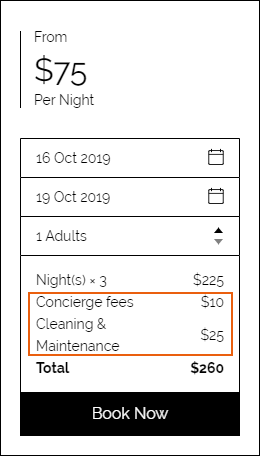
You can add additional charges to your hotel reservations, such as cleaning or booking fees. These charges are included in the order total and are visible in the order summary under the price breakdown.
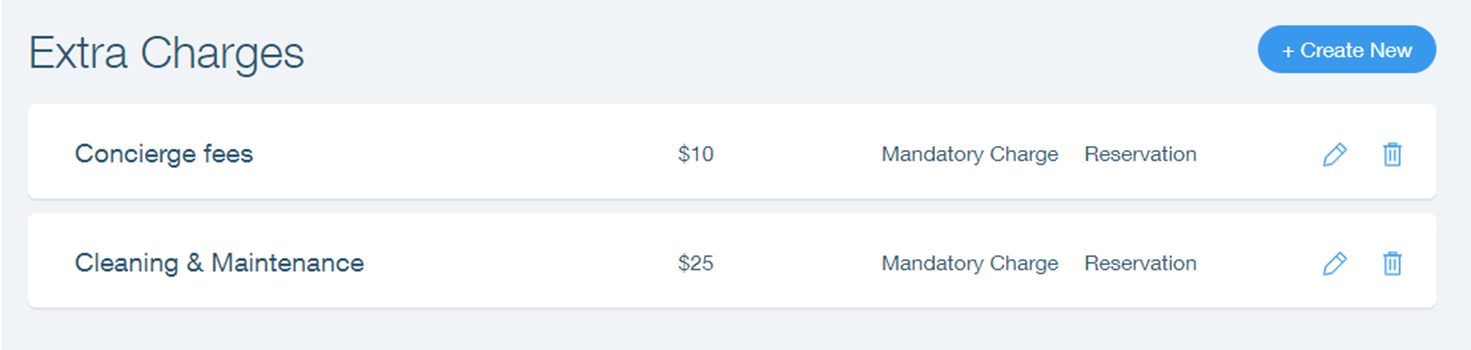
To add extra charges to your hotel:

  1. Go to your dashboard.

  2. Click the Hotels tab.

  3. Click the Price Options tab.

  4. Click Extra Charges.

  5. Click Create New.

  6. Enter the name of the extra charge.

  7. Click the Set charge type drop-down menu and select an option:Mandatory Charge: The service is not optional. Your guests are required to pay the charge.
    Optional Extra: The service is optional. If your guests do not choose to add it, they are not required to pay.
    Note:If your charge is optional, you can add a photo and description to explain the service.

  8. Click the Add charge per drop-down menu and select an option:Reservation: The extra charge is per reservation. For example, cleaning fees.
    Person: The extra charge is per person. For example, breakfast.

  9. Enter the price of the charge.

  10. Select or deselect the Non-Taxable checkbox:Selected: Tax is not added to the extra charge.
    Deselected: Tax is added to the extra charge.

  11. Click Save.

Need A Professional Website?
Contact Us 
Today!

Wix Chat: Automatically Sending Chat Messages or Responding to Chat Messages

Wix Chat: About Notifications

Wix Chat: Deleting Wix Chat

Wix Chat: Adding the WhatsApp Channel to Your Chatbox

Wix Chat: Viewing and Chatting with Live Site Visitors

Wix Chat: Customizing the Chat Icon on Your Mobile Site

Wix Chat: Translating Wix Chat

Wix Chat: Allowing Members to Chat with Each Other Using Members Chat

Wix Chat: Customizing Your Chat Settings

Wix Chat: Designing Your Chatbox

Wix Chat: Adding Wix Chat to Your Site

Wix Chat: An Overview

Your AI Site-Chat Conversations Quota

Designing and Customizing Wix AI Site-Chat

Training Your AI Site-Chat

Testing Your Wix AI Site-Chat

Adding and Setting Up Wix AI Site-Chat

About Wix AI Site-Chat

Wix Inbox: Sending a Broadcast Message to Your Contacts in the Wix App

Wix Inbox: Working with Site Collaborators

Wix Inbox: Connecting WhatsApp Business to Inbox

Wix Inbox: Connecting Your Facebook Page

Wix Inbox: Connecting Instagram to Inbox

Wix Inbox: About Wix Inbox Channels

Wix Inbox: Connecting Your Gmail Account

Wix Inbox: Managing Your Notification Settings

Wix Inbox: Managing Your Inbox

Wix Inbox: Setting Up Your Inbox Profile and Outgoing Emails

Wix Inbox: Sending Messages and Attaching Items

Wix Inbox: An Overview

wix experts
Graphic2Traffic web design
©
bottom of page