top of page

Business Email Basics

Adding a DKIM (TXT) Record

A Domain Keys Identified Mail (DKIM) record is an email authentication tool. Adding it to your business email verifies that your email was sent from a reliable, trustworthy source and was not modified en route to your recipients.

Important:

If your domain is connected via pointing, these directions do not apply. Contact your domain host to add DKIM records with them, as they control your DNS.

Before you begin:

  • You need to get the DKIM record from your email provider.

  • The DKIM key bit length can be either 2048 or 1024 characters.

To add or update a DKIM record:

  1. Go to Domains in your Wix account.

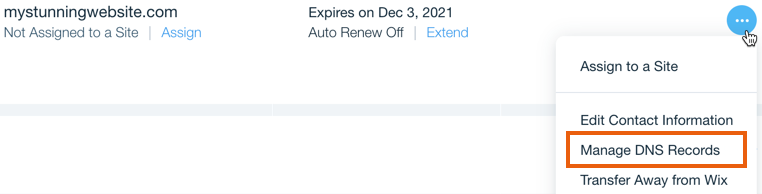
  2. Click the Domain Actions icon  next to the relevant domain.

  3. Select Manage DNS Records.

A screenshot showing the Manage DNS Records option in the Domain Actions menu.

  1. Scroll to the TXT (Text) section and click + Add Record.
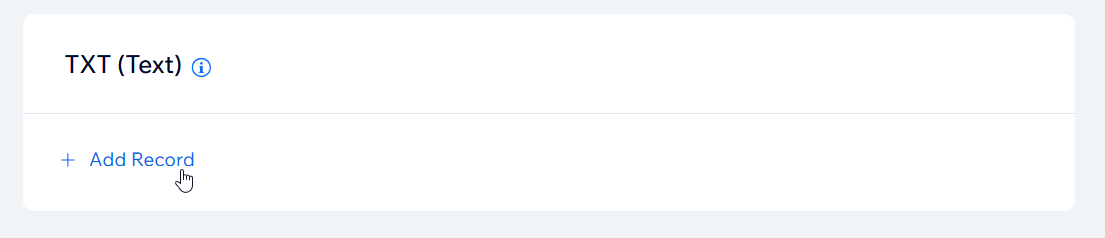
A screenshot showing the Add Record button to add a TXT record in a Wix account.

  1. Enter the DKIM selector under Host Name
    Note: For Google Workspace business emails, generate a DKIM record at this link.

  2. Enter the DKIM signature under Value.

  3. Click Save.

Need A Professional Website?
Contact Us 
Today!

Wix Chat: Automatically Sending Chat Messages or Responding to Chat Messages

Wix Chat: About Notifications

Wix Chat: Deleting Wix Chat

Wix Chat: Adding the WhatsApp Channel to Your Chatbox

Wix Chat: Viewing and Chatting with Live Site Visitors

Wix Chat: Customizing the Chat Icon on Your Mobile Site

Wix Chat: Translating Wix Chat

Wix Chat: Allowing Members to Chat with Each Other Using Members Chat

Wix Chat: Customizing Your Chat Settings

Wix Chat: Designing Your Chatbox

Wix Chat: Adding Wix Chat to Your Site

Wix Chat: An Overview

Your AI Site-Chat Conversations Quota

Designing and Customizing Wix AI Site-Chat

Training Your AI Site-Chat

Testing Your Wix AI Site-Chat

Adding and Setting Up Wix AI Site-Chat

About Wix AI Site-Chat

Wix Inbox: Sending a Broadcast Message to Your Contacts in the Wix App

Wix Inbox: Working with Site Collaborators

Wix Inbox: Connecting WhatsApp Business to Inbox

Wix Inbox: Connecting Your Facebook Page

Wix Inbox: Connecting Instagram to Inbox

Wix Inbox: About Wix Inbox Channels

Wix Inbox: Connecting Your Gmail Account

Wix Inbox: Managing Your Notification Settings

Wix Inbox: Managing Your Inbox

Wix Inbox: Setting Up Your Inbox Profile and Outgoing Emails

Wix Inbox: Sending Messages and Attaching Items

Wix Inbox: An Overview

wix experts
Graphic2Traffic web design
©
bottom of page