top of page

Adding videos & channels

Wix Video: Scheduling A Publish Time for Videos

You can set times for your videos to appear on your site whenever you need. This is a great way to ensure that videos are automatically and regularly published to your site, without having to manually publish them.
Notes:

  • You need to add the video first before you can schedule it.

  • Once you've scheduled the video, it won't appear on your site until the specified publish date and time.

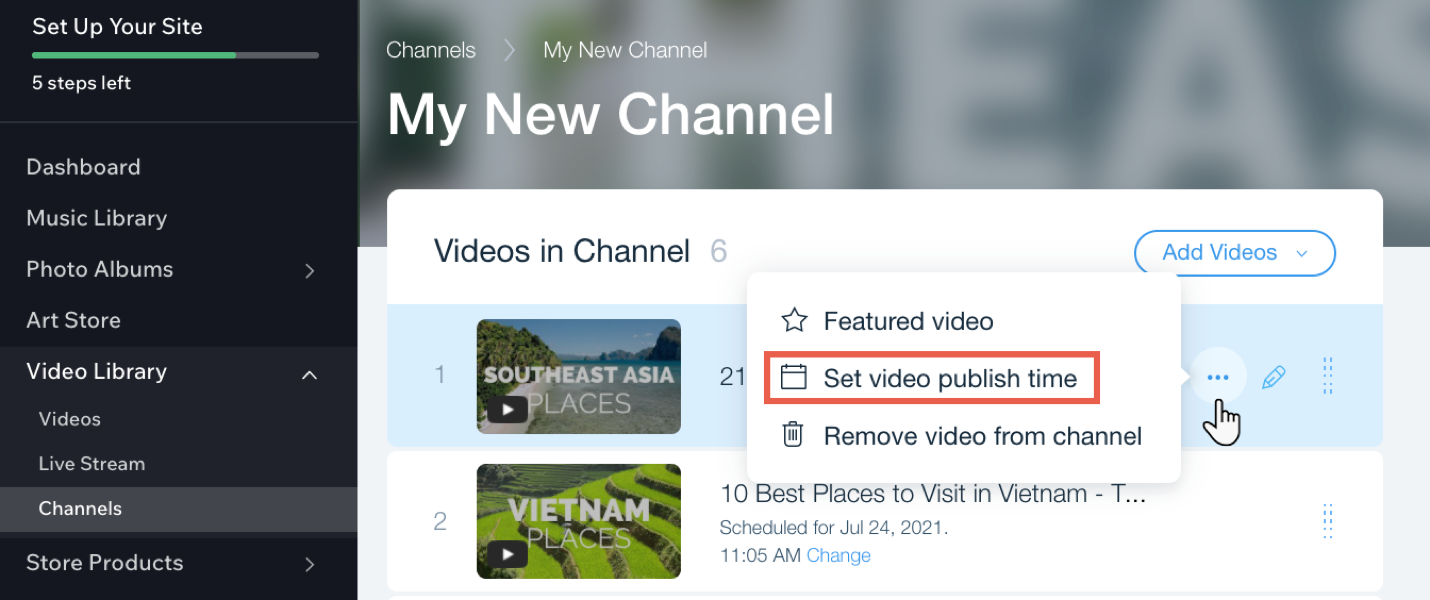
To schedule a publish time for videos in your channel:

  1. Go to Video Library in your site's dashboard.

  2. Click the Channels tab.

  3. Click the relevant channel.

  4. Hover over the relevant video and click the Show more icon .

  5. Click Set video publish time.

  6. Select a date and time.

  7. Click Save.

Tip:

You can change the time of a video by clicking Change next to the current scheduled time.

Need A Professional Website?
Contact Us 
Today!

Wix Photo Albums: Editing Your Photo Album

Wix Photo Albums: Designing Your Photo Album

Wix Photo Albums: Changing the Focal Point of Images in Your Photo Album

Wix Photo Albums: About the Photo Albums Media Manager

Wix Photo Albums: Adding New Media to an Album

Wix Photo Albums: Accessing Your Photo Albums

Wix Photo Albums: Publishing Your Album

Wix Photo Albums: Creating a Photo Album

Wix Photo Albums: About Wix Photo Albums

Wix Restaurants: Managing Your Menus on the Wix App

Wix Restaurants: Contacting Restaurant Customers From the Wix App

Wix Restaurants: Managing Restaurant Notifications in the Wix App

Wix Restaurants: About the Wix App for your Restaurant

Wix Restaurants: Deleting the Restaurant Orders app

Wix Restaurants: Using Wix Restaurants to Offer Catering Services

Wix Restaurants: Allowing Customers to Place Orders for a Future Date

Wix Restaurants: Offering Free Delivery for Orders over a Specific Price

Wix Restaurants: Exporting Online Orders

Wix Restaurants: Customizing the Mobile View of your Orders App

Wix Restaurants: Designing Your Orders App

Wix Restaurants: Using a Webhook to Integrate Wix Restaurants with Third-Party Services

Wix Restaurants: Setting Up Events for Your Restaurant's Availability

Wix Restaurants: Setting Up Your Privacy Policy & Terms and Conditions

Wix Restaurants: Creating Discounts for Your Customers

Wix Restaurants: Sending Confirmation Emails for Orders

Wix Restaurants: Printing an Order

Wix Restaurants: Setting Notifications for Online Orders

Wix Restaurants: Understanding Wix Analytics Reports

Wix Restaurants: Automatically Responding to Incoming Orders

Wix Restaurants: Limiting the Number of Orders Placed

wix experts
Graphic2Traffic web design
©
bottom of page