top of page

Taking online orders

Wix Restaurants: Using Wix Restaurants to Offer Catering Services

Important:

Catering services are services that customers can order in advance for a specific date and time. You can offer catering using the Wix Restaurants online ordering feature. You'll just have to make a few updates to the pickup and delivery settings, and set how far in advance customers can place their orders.

Before you begin:

Make sure you've already set up online ordering for your restaurant site.

To offer catering services using Wix Restaurants:

  1. Go to Order Settings in your site's dashboard.

  2. Click the Pickup tab.Set the pickup time for 0 minutes.
    Click Save at the top right.

  3. Click the Delivery tab.Click into each delivery area to edit them.
    Set the Maximum Delivery Time to 0 minutes.
    Click Save at the top right.

  4. Click the Order scheduling tab.Click the Scheduled orders toggle to enable it and set how far in advance customers can place orders:
    Minimum time: Enter a number and select Minutes, Hours or Days from the drop-down list.
    Note: This is the minimum time customers can place a future order in advance.
    Maximum time: Enter a maximum number and select Minutes, Hours or Days from the drop-down list.
    Note: This is the maximum time customers can place a future order in advance.
    Disable the ASAP toggle.
    Click Save at the top right.
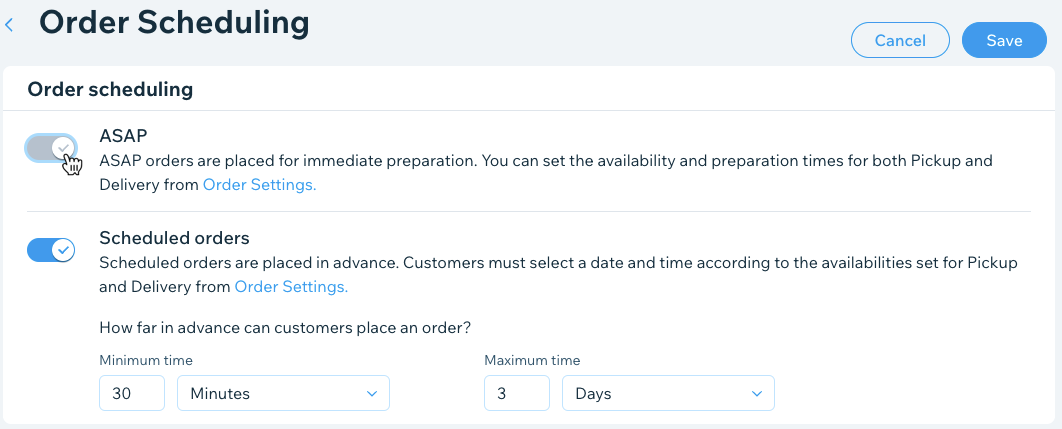
A screenshot of toggling of ASAP orders in order scheduling.

Need A Professional Website?
Contact Us 
Today!

Wix Stores: Offering Customers a Choice of Delivery Options

Wix Stores: A Guide to Setting Up Shipping, Delivery, and Pickup

Wix Stores: Displaying Product Categories on Mobile

Wix Stores: Displaying Product Subcategories

Wix Stores: SEO for Category Pages

Wix Stores: Displaying Product Categories

Wix Stores: About the Category Page

Wix Stores: Creating Product Categories

Wix Stores: About Product Categories

Wix Stores: Managing Your Product List

Wix Stores: Customizing the Product List and Saving Your View

Wix Stores: Product Import Error Messages

Wix Stores: Exporting Your Product List

Wix Stores: Importing Products to Wix Stores

Wix Stores: Sharing Products on Social Media

Wix Stores: Changing the Order of Products in a Category

Wix Stores: Deleting Store Products

Wix Stores: Managing Product Subscriptions

Wix Stores: Selling Product Subscriptions

Wix Stores: Editing Multiple Products at the Same Time

Wix Stores: Searching for Products in the Store Products Tab

Wix Stores: Changing the Visibility of a Product

Wix Stores: Calculating Cost of Goods

Wix Stores: Managing Product Ribbons

Wix Stores: Displaying Product Prices as a Price Range

Wix Stores: Displaying the Product Price per Unit

Wix Stores: Scheduling Product Discounts Using the Wix Store Scheduler App

Wix Stores: Applying Sale Prices to Store Products

Wix Stores: Allowing Customers to Pre-Order Products

Wix Stores: Allowing Customers to Add a Message When Purchasing a Product

wix experts
Graphic2Traffic web design
©
bottom of page