top of page

Creating your Wix Restaurants menu

Wix Restaurants: Deleting the Menus by Wix Restaurants App

Important:

This article is about the original Wix Restaurants Menus App. Try out our new menu app. Learn how to add and set up Wix Restaurants Menus (New) app.

Menus by Wix Restaurants is a full-page app, therefore in order to delete the app, you must delete the page itself from your site's Editor.

Important:

When you delete your Menus app, any menus and orders associated with it will be permanently deleted.

Wix Editor

Editor X

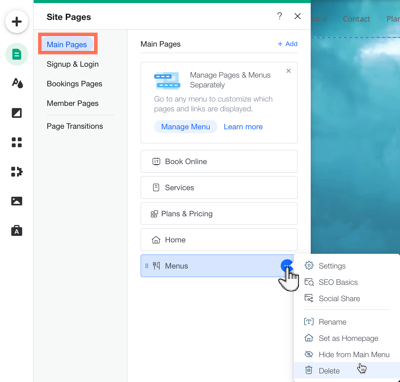
  1. Click the Pages iconon the left side of the Editor.

  2. Click Main Pages.

  3. Hover over the Menus page and click the More Actions icon .

  4. Click Delete.

  5. Click Delete to confirm.

A screenshot of clicking the more actions over menus in your editor.

Need A Professional Website?
Contact Us 
Today!

How to create an online store on Wix?

How to connect Google Analytics to Wix?

How to improve SEO on Wix?

How to add pages to a Wix site?

How to change your site’s background?

How to customize a Wix template?

How to create a website on Wix?

What analytics tools are available on Wix?

Does Wix support email marketing?

Can I add a blog to my Wix site?

Does Wix offer SEO tools?

Can I sell on social media with Wix?

Can I sell subscriptions on Wix?

What payment methods does Wix support?

Can I create an online store with Wix?

Does Wix allow for responsive design?

Can I use animations on my Wix site?

What is the Wix Editor?

How do I log in to my Wix account?

Can I build a multilingual website on Wix?

Is Wix better than WordPress?

What types of websites can I create with Wix?

What is Wix?

wix experts
Graphic2Traffic web design
©
bottom of page