top of page

Creating your Wix Restaurants menu

Wix Restaurants: Deleting the Menus by Wix Restaurants App

Important:

This article is about the original Wix Restaurants Menus App. Try out our new menu app. Learn how to add and set up Wix Restaurants Menus (New) app.

Menus by Wix Restaurants is a full-page app, therefore in order to delete the app, you must delete the page itself from your site's Editor.

Important:

When you delete your Menus app, any menus and orders associated with it will be permanently deleted.

Wix Editor

Editor X

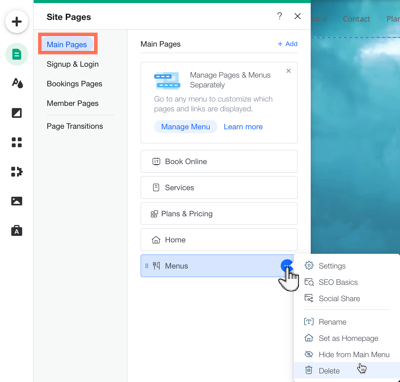
  1. Click the Pages iconon the left side of the Editor.

  2. Click Main Pages.

  3. Hover over the Menus page and click the More Actions icon .

  4. Click Delete.

  5. Click Delete to confirm.

A screenshot of clicking the more actions over menus in your editor.

Need A Professional Website?
Contact Us 
Today!

Wix Bookings: Managing Your Business Hours Using the Wix App

Wix Bookings: Promoting Your Services from the Wix App

Wix Bookings: Connecting Membership Plans and Packages Using the Wix App

Wix Bookings: Offering Waitlists Using the Wix App

Wix Bookings: Sending a Broadcast Message Using the Wix App

Wix Bookings: Viewing Your Upcoming Sessions in the Wix App

Wix Bookings: Managing Bookings in the Wix App

Wix Bookings: Marking Attendance for Classes and Courses Using the Wix App

Wix Bookings: Accessing the Details of a Class Session in the Wix App

Wix Bookings: Creating Classes Using the Wix Mobile Apps

Wix Bookings: Creating Appointments Using the Wix App

Wix Bookings: Marking a Session as "Paid" in the Wix App

Wix Bookings: Manually Scheduling Bookings for Clients Using the Wix App

Wix Bookings: Adding Wix Bookings from the Wix App

Wix Bookings: Creating and Managing Shareable Links

Wix Bookings: Managing Your Outbound Client Emails

Wix Bookings: Adding and Setting Up a Google 'Book' Button

Wix Bookings: Letting Clients Book Your Services With ClassPass

Wix Bookings: Adding a 'Book' Button to Instagram

Wix Bookings: Adding a 'Book' Button to Facebook

Wix Bookings: About Booking Integrations

Wix Bookings: Adding and Setting up a Loyalty Program for Your Business

Wix Bookings: Sending Custom SMS Messages with Omnisend

Wix Bookings: Creating Discount Coupons with Automations

Wix Bookings: Sending SMS Notifications to Clients

Wix Bookings Troubleshooting: Emails Not Received

Wix Bookings: Managing Email Notifications You Receive

Wix Bookings: Creating Bookings Automations

Wix Bookings: Creating Discount Coupons

Wix Bookings: Customizing Your Daily Agenda

wix experts
Graphic2Traffic web design
©
bottom of page