top of page

Creating your Wix Restaurants menu

Wix Restaurants: Deleting the Menus by Wix Restaurants App

Important:

This article is about the original Wix Restaurants Menus App. Try out our new menu app. Learn how to add and set up Wix Restaurants Menus (New) app.

Menus by Wix Restaurants is a full-page app, therefore in order to delete the app, you must delete the page itself from your site's Editor.

Important:

When you delete your Menus app, any menus and orders associated with it will be permanently deleted.

Wix Editor

Editor X

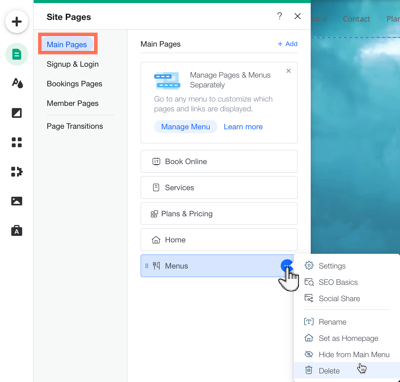
  1. Click the Pages iconon the left side of the Editor.

  2. Click Main Pages.

  3. Hover over the Menus page and click the More Actions icon .

  4. Click Delete.

  5. Click Delete to confirm.

A screenshot of clicking the more actions over menus in your editor.

Need A Professional Website?
Contact Us 
Today!

Wix Restaurants: Setting Up Your Restaurant Address and Phone Number

Wix Restaurants: An Overview

Pricing Plans: Creating Coupons Using the Wix App

Pricing Plans: Customizing Your Plans on the Wix Mobile Apps

Pricing Plans: Enabling Invoices for Plan Purchases in the Wix App

Pricing Plans: Setting Up Tax in the Wix App

Pricing Plans: Connecting a Plan to Content & Services in the Wix App

Pricing Plans: Creating an Introductory Offer Using the Wix App

Pricing Plans: Selling Plans Offline Using the Wix App

Pricing Plans: Managing Purchased Plans in the Wix App

Pricing Plans: Creating Plans in the Wix App

Pricing Plans: Adding Pricing Plans in the Wix App

Pricing Plans: Updating the Payment Method on a Customer Subscription

Pricing Plans: Changing the Payment Date for Recurring Subscriptions

Pricing Plans: Understanding Wix Analytics Subscriptions Reports

Pricing Plans: Viewing and Downloading Analytics Reports

Pricing Plans: Viewing and Editing Your Client Information

Pricing Plans: Limiting Your Blog to Members Who Purchased a Pricing Plan

Pricing Plans: Viewing a Client's Subscription and Payment History

Pricing Plans: Canceling Client Plans

Pricing Plans: Checking How Many Package Sessions Were Used

Pricing Plans: Managing Your Clients' Subscriptions

Pricing Plans: Temporarily Suspending a Plan

Pricing Plans: Creating Discount Coupons

Pricing Plans: Selling Plans Offline

Pricing Plans: Displaying Different Plan Types Using Tabs

Pricing Plans: Customizing Your Thank You Page

Pricing Plans: Customizing the Mobile View of the Pricing Plans Page

Pricing Plans: Displaying Plans on Multiple Site Pages

Pricing Plans: Customizing the Look of Your Pricing Plans Page

wix experts
Graphic2Traffic web design
©
bottom of page