top of page

Taking online orders

Wix Restaurants: Allowing Customers to Add a Tip to an Order

Important:

Make payments easier for customers with a good checkout experience by allowing them to add a tip to their credit card when paying. You can customize the default tip options and allow customers to leave a tip in their requested amount.
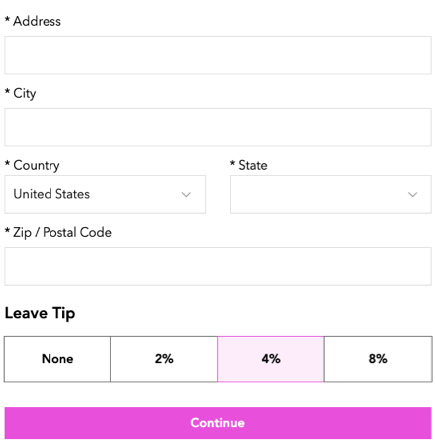
A screenshot of how customers can leave a tip.

Before you begin:

Verify that you have set up your payment methods in your payment settings. Tips don't work with manual/offline payments.

To allow customers to add a tip:

  1. Go to Order Settings in your site's dashboard.

  2. Click the Advanced tab at the bottom.

  3. Enable the Tips toggle to allow customers to leave a tip when placing an order.
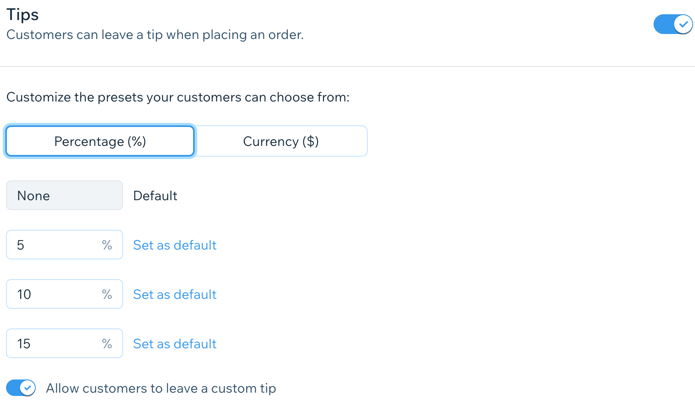
A screenshot of setting up tips.

  1. (Optional) Customize the preset tip options:Click to select a default unit for the tip (Percentage or Currency).
    Enter 3 different values for the preset tip in the text fields.
    Note: You can click Set as default by one of the preset amounts to select it as the default for tips.

  2. Enable the Allow customers to leave a custom tip toggle to allow customers to leave a tip in their desired amount.

  3. Click Save.

Need A Professional Website?
Contact Us 
Today!

Wix Bookings: Selecting How You Charge for Bookings Services

Wix Bookings: Offering Packages

Wix Bookings: Creating a Membership Plan

Wix Bookings: About Memberships and Packages

Wix Bookings: About Getting Paid Online

Wix Bookings: Increasing Bookings with the Service Upsell Guru App

Wix Bookings: Adding and Setting Up an Appointment Waitlist

Wix Bookings: Charging a Cancellation or No-Show Fee

Wix Bookings: Editing an Existing Order

Wix Bookings: Adding and Setting Up the Map Plugin on the Service Page

Wix Bookings: Adding Internal Notes on the Bookings List App

Wix Bookings: Letting Clients Check In by Scanning a Chip, Card or Barcode

Wix Bookings: Blocking Off Time for Multiple Staff Members

Wix Bookings: Managing Your Business with the Booking Activity Panel

Wix Bookings: Installing and Setting up the Client Check in App

Wix Bookings: About the Orders Tab

Wix Bookings: Managing Bookings with the Booking List

Wix Bookings: Displaying Class Times on Your Site

Wix Bookings: Scheduling Your Courses

Wix Bookings: Viewing Booking Form Responses

Wix Bookings: Service Times on Live Site Differ from Service Times in Calendar

Wix Bookings: Exporting Reports on Bookings and Staff

Wix Bookings: Viewing a Client's Booking and Payment History

Wix Bookings: Viewing and Editing Client Info

Wix Bookings: Syncing Your Microsoft Calendar

Wix Bookings: Filtering Your Booking Calendar

Wix Bookings: Syncing Your Apple Calendar

Wix Bookings: Syncing Bookings and Google Calendars

Wix Bookings: About Syncing Personal Calendars with Wix Bookings

Wix Bookings: Adding a Note to a Specific Booking Session

wix experts
Graphic2Traffic web design
©
bottom of page