top of page

Setting up Photo Albums

Wix Photo Albums: Publishing Your Album

Once you're finished creating and editing your photo album, go ahead and publish it to make it live. Make sure to review your album name before publishing. The name is used in your album's URL which is a subdomain of your site's domain.

In this article, learn more about:

Publishing your photo album

Ready to go live with your latest photo album? You can publish the album directly from your album editor.

To publish your photo album:

  1. Go to Photo Albums in your site's dashboard.

  2. Click Edit next to the relevant album.

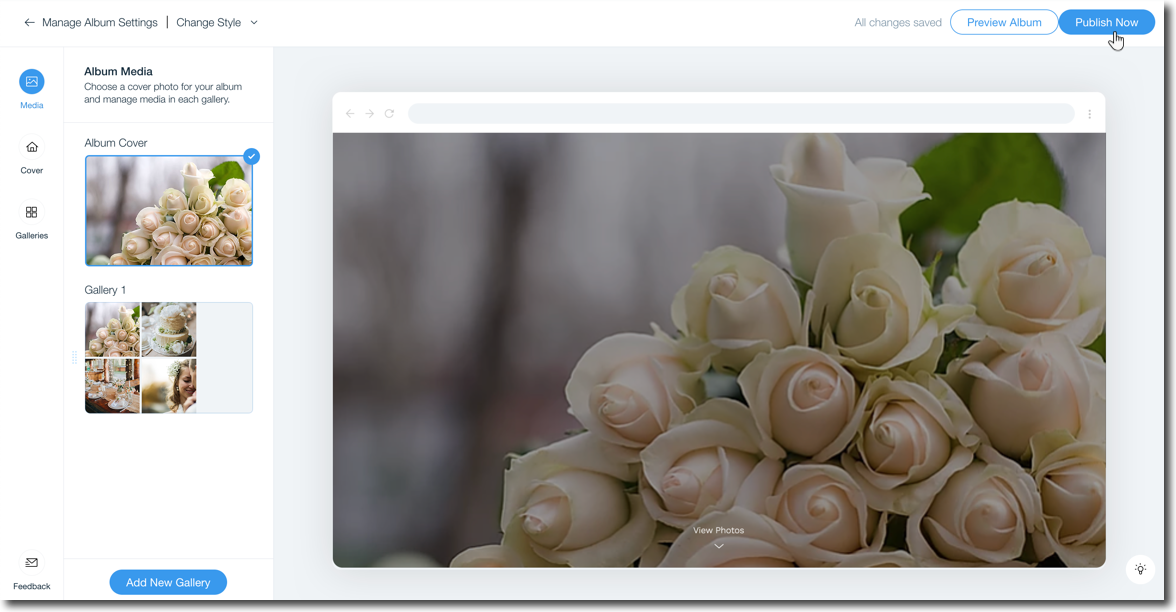
  3. Click Publish Now at the top right.

A screenshot showing the option to publish your album in the album editor.

FAQs

Click a question below to learn more about publishing your photo album.

What blockers might I face when trying to publish my album?

You cannot publish your album if:

  • You have not made any changes since the last time you published.

  • You did not upload any of your own photos.

  • You are not the owner of the site (if you are a site collaborator).

Can I unpublish an album I no longer need?

No, it is not possible to unpublish a photo album. You can only hide or delete the album.

I made changes to my URL, does it take long to update?

It can take up to 24 hours for the live URL to update to include your domain.

My domain is connected to Wix via Pointing, can I connect a subdomain?

Subdomains cannot be connected to a domain that is connected to Wix via Pointing. Learn how to switch your domain connection method.

Why do I have a Wix Promo banner on my album?

Photo Albums published to free sites without a custom domain or premium plan will display a Wix promo banner at the top similar to other site pages

Need A Professional Website?
Contact Us 
Today!

Wix Stores: Offering Customers a Choice of Delivery Options

Wix Stores: A Guide to Setting Up Shipping, Delivery, and Pickup

Wix Stores: Displaying Product Categories on Mobile

Wix Stores: Displaying Product Subcategories

Wix Stores: SEO for Category Pages

Wix Stores: Displaying Product Categories

Wix Stores: About the Category Page

Wix Stores: Creating Product Categories

Wix Stores: About Product Categories

Wix Stores: Managing Your Product List

Wix Stores: Customizing the Product List and Saving Your View

Wix Stores: Product Import Error Messages

Wix Stores: Exporting Your Product List

Wix Stores: Importing Products to Wix Stores

Wix Stores: Sharing Products on Social Media

Wix Stores: Changing the Order of Products in a Category

Wix Stores: Deleting Store Products

Wix Stores: Managing Product Subscriptions

Wix Stores: Selling Product Subscriptions

Wix Stores: Editing Multiple Products at the Same Time

Wix Stores: Searching for Products in the Store Products Tab

Wix Stores: Changing the Visibility of a Product

Wix Stores: Calculating Cost of Goods

Wix Stores: Managing Product Ribbons

Wix Stores: Displaying Product Prices as a Price Range

Wix Stores: Displaying the Product Price per Unit

Wix Stores: Scheduling Product Discounts Using the Wix Store Scheduler App

Wix Stores: Applying Sale Prices to Store Products

Wix Stores: Allowing Customers to Pre-Order Products

Wix Stores: Allowing Customers to Add a Message When Purchasing a Product

wix experts
Graphic2Traffic web design
©
bottom of page