top of page

Selling and promoting your music

Wix Music: Setting Up Your Payment Methods

Your fans can buy your music in Wix Music and Wix does not charge a cent.

Important:

  • Set up your payment methods by following the steps below before selling your music.

  • The album should not be edited after a purchase is made as this can cause an error with the download link.

To set up your payments:

  1. Go to Accept Payments in your site's dashboard.

  2. Set up the payment methods you want to use.

To change your currency:

  1. Go to Music Library in your site's dashboard.

  2. Hover over the relevant single/album/playlist and click the More Actions icon.

  3. Click Edit.

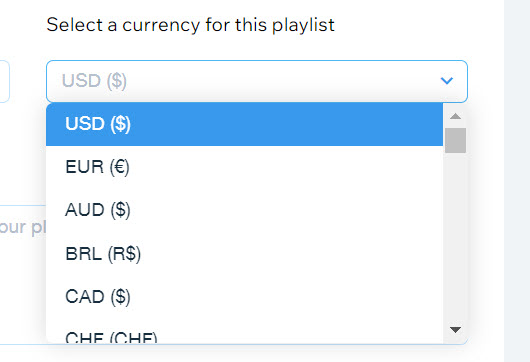
  4. Click the drop-down under Select a currency for this playlist.

  5. Select a currency.

  6. Click Save.

A screenshot of the currency selection drop-down menu.

Notes:

  • Currently, the following payment processors are not supported with Wix Music:pagueloFacil
    Isracard
    Offline.

  • For Wix Payments, there is a minimum amount of $1 per transaction. Make sure your release/track/album's price is over $1 if you're using this payment processor.

Need A Professional Website?
Contact Us 
Today!

Wix Restaurants: Customizing and Designing Your Menu

Wix Restaurants: Setting the Availability of Menus, Sections and Dishes

Wix Restaurants: Creating a Combo Meal

Wix Restaurants: Managing Dish Options

Wix Restaurants: Adding Images to Your Menus

Wix Restaurants: Creating Your Menus

Wix Restaurants: Setting Up Your Availability for Online Reservations

Wix Restaurants: Managing Your Reservation Schedule

Wix Restaurants: Customizing Your Table Reservations Form

Wix Restaurants: Managing Table Reservations and Walk-ins

Wix Restaurants: Managing Your Notifications for Table Reservations

Wix Restaurants: Sending Reservation Notifications to Guests

Wix Restaurants: Setting Up Prepayment for Table Reservations

Wix Restaurants: Adding a Reservation Widget to a Page

Wix Restaurants: Viewing Guest Stats in Wix Table Reservations

Wix Restaurants: Exporting Your Table Reservations

Wix Restaurants: Translating Your Restaurant Reservations

Wix Restaurants: Deleting the Table Reservations App

Wix Restaurants: Creating and Managing your Restaurant Floor Plan

Wix Restaurants: Adding and Setting Up Wix Table Reservations

Wix Restaurants: Creating Another Online Ordering Page

Wix Restaurants: Setting Up Order with Google

Wix Restaurants: Managing Notifications for Online Orders

Wix Restaurants: Saving and Charging Customers' Credit Cards

Wix Restaurants: Managing Orders With DoorDash Drive

Wix Restaurants: Setting Up DoorDash Drive for Your Restaurant

Wix Restaurants: Manually Creating an Order

Wix Restaurants: Manually Printing Online Orders from the Wix App

Wix Restaurants: Troubleshooting Thermal Printing of Online Orders (new) from the Wix App

Wix Restaurants: Printing Online Orders from the Wix App

wix experts
Graphic2Traffic web design
©
bottom of page