top of page

Wix Mobile POS

Wix Mobile POS: Collecting Tips

Important:

  • This article is about Wix Mobile POS for mobile phones.

  • For info on Wix Retail POS for brick and mortar stores, click here.

Let clients who want to leave a tip do so right in your Mobile POS. You can display preset tip percentages or allow customers to decide on the tip.
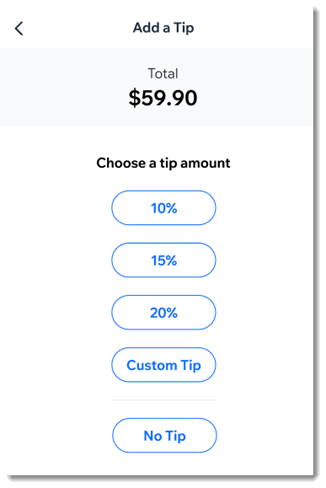
An example of the tip screen customers see on the mobile POS

After you enable tipping, you'll see the option to add a tip as part of the checkout.

Notes:

  • To collect tips, Wix Payments must be your payment provider.

  • It's not possible to collect tips for cash payment or when processing split payments.

  • Tips are available with Wix Stores, Wix Booking, and  Wix Restaurants Orders (New) .

To enable tipping:

  1. Go to your site in the Wix app.

  2. Tap Manage  at the bottom.

  3. Scroll down to the Get Paid section and tap Point of Sale.

  4. Tap the More Actions icon   at the top right.

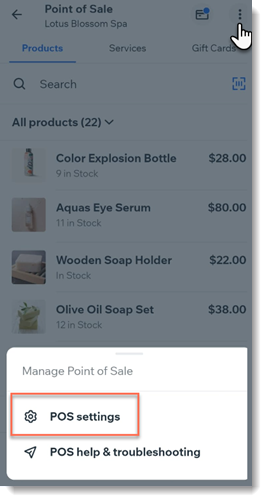
  5. Tap POS settings.
    Note: If you don't have the POS settings option, see the note below.

  6. Select Tips.

  7. Tap the Collect tips toggle to enable it.

  8. (Optional) Change the preset tip percentages:Tap the tip option you want to update.
    Enter a new percentage.

  9. (Optional) Tap the Allow a custom tip amount toggle to enable it.

  10. Tap Save.

Adding POS settings:

Normally, you should be able to access the POS Settings by clicking the More Actions icon  at the top right.
Screenshot of a Wix App point of sale page after clicking the More Actions button with POS settings outlined
If the settings aren't displayed, you can access them by adding Wix Stores to your site.
Note: Make sure you hide store pages from your live site.

Need A Professional Website?
Contact Us 
Today!

Wix Events: Creating Membership Plans Using the Wix App

Wix Events: Customizing Events Displayed in the Member Apps

Wix Events: Changing Registration Settings Using the Wix App

Wix Events: Inviting Guests to Join an Event from the Wix App

Wix Events: Managing Event Orders Using the Wix App

Wix Events: Starting Discussions with Event Guests on the Wix Member Apps

Wix Events: Creating Event Coupons Using the Wix App

Wix Events: Managing Guests and Events Using the Wix App

Wix Events: Broadcasting a Message to Guests Using the Wix App

Wix Events: Checking-In Guests Using the Wix App

Wix Events: Creating a Ticketed Event Using the Wix App

Wix Events: Creating an RSVP Event Using the Wix App

Wix Events: Creating Gift Cards

Wix Events: Promoting Your Event With Hopp

Wix Events: Using Wix Automations to Promote an Event

Wix Events: Adding and Setting up a Loyalty Program

Wix Events Troubleshooting: Unable to Apply Coupons in Wix Events

Wix Events: Creating Event Coupons

Wix Events: Creating a Membership Plan

Wix Events: Promoting Your Events

Wix Events: Sending Invitations or Promotions Using Email Marketing

Wix Events: Creating Invoices for Ticketed Events

Wix Events: Understanding Wix Analytics Reports

Wix Events: Canceling and Refunding Orders for Events with Tickets

Wix Events: Managing Ticket Orders

Wix Events: Viewing and Managing Your Event Tickets

Wix Events: Adding Tax to Tickets Sales

Wix Events: Collecting Guest Info for Individual Event Tickets

Wix Events: Setting Up a Payment Method

Wix Events: About Wix Ticket Service Fees

wix experts
Graphic2Traffic web design
©
bottom of page