top of page

Designing Wix Events

Wix Events: Displaying a Standalone Wix Events Button

If you write about an event somewhere on your site other than the Wix Events page, you can add a standalone event button. This makes it easy for interested site visitors to book.

Note:

The standalone event button is currently not available in Editor X.

To add an event button:

  1. Click Addon the left side of the Editor.

  2. Select Events.

  3. Drag the single event display to the page.
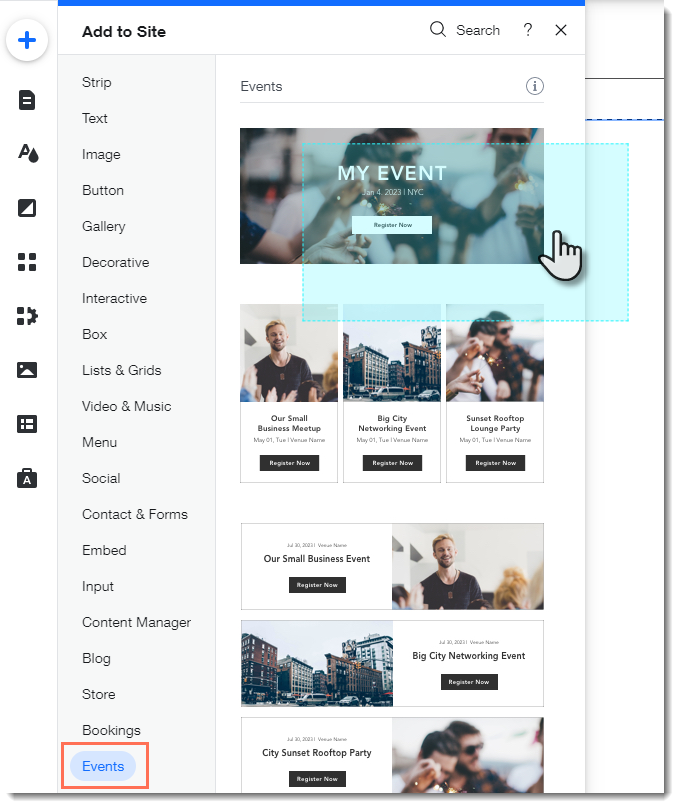
  1. Click the Wix Events app in the Editor.

  2. Click Display Events.

  3. Under What do you want to show?, select A Single Event.

  4. Select the relevant event.

  5. Click the Layout tab.

  6. Select Button.

  7. (Optional) Edit the button:Click the Text tab to edit the button text or add a label.
    Click the Design tab to edit the look of the button.

Need A Professional Website?
Contact Us 
Today!

Wix Photo Albums: Editing Your Photo Album

Wix Photo Albums: Designing Your Photo Album

Wix Photo Albums: Changing the Focal Point of Images in Your Photo Album

Wix Photo Albums: About the Photo Albums Media Manager

Wix Photo Albums: Adding New Media to an Album

Wix Photo Albums: Accessing Your Photo Albums

Wix Photo Albums: Publishing Your Album

Wix Photo Albums: Creating a Photo Album

Wix Photo Albums: About Wix Photo Albums

Wix Restaurants: Managing Your Menus on the Wix App

Wix Restaurants: Contacting Restaurant Customers From the Wix App

Wix Restaurants: Managing Restaurant Notifications in the Wix App

Wix Restaurants: About the Wix App for your Restaurant

Wix Restaurants: Deleting the Restaurant Orders app

Wix Restaurants: Using Wix Restaurants to Offer Catering Services

Wix Restaurants: Allowing Customers to Place Orders for a Future Date

Wix Restaurants: Offering Free Delivery for Orders over a Specific Price

Wix Restaurants: Exporting Online Orders

Wix Restaurants: Customizing the Mobile View of your Orders App

Wix Restaurants: Designing Your Orders App

Wix Restaurants: Using a Webhook to Integrate Wix Restaurants with Third-Party Services

Wix Restaurants: Setting Up Events for Your Restaurant's Availability

Wix Restaurants: Setting Up Your Privacy Policy & Terms and Conditions

Wix Restaurants: Creating Discounts for Your Customers

Wix Restaurants: Sending Confirmation Emails for Orders

Wix Restaurants: Printing an Order

Wix Restaurants: Setting Notifications for Online Orders

Wix Restaurants: Understanding Wix Analytics Reports

Wix Restaurants: Automatically Responding to Incoming Orders

Wix Restaurants: Limiting the Number of Orders Placed

wix experts
Graphic2Traffic web design
©
bottom of page