top of page

Additional Wix Apps

Wix Apps: Task List

The Wix Task List add-on enables you to set up and monitor a list of tasks to complete while working on your site. Think of it like a to-do list that's integrated into your site just for you or your co-workers.

A screenshot showing the Task List add on inside the Studio Editor.

To add the Task List add-on to your site:

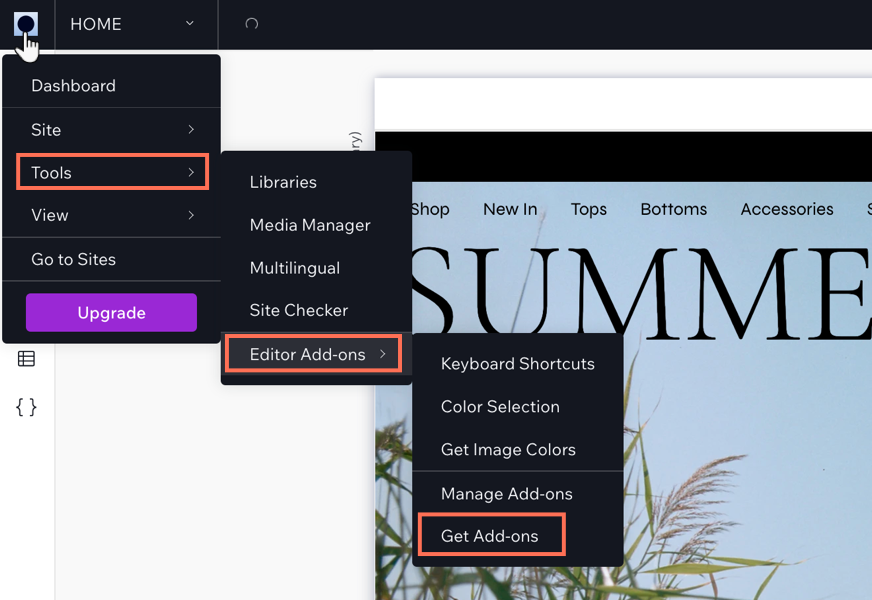
  1. Click the Wix Studio icon  at the top left.

  2. Click Tools.

  3. Click Editor Add-ons.

  4. Click Get Add-ons.

  5. Hover over Task List and click Add.

A screenshot showing the Wix Studio icon and the option to get add-ons.

Once you have added Task List, you can start creating tasks for yourself. When you have finished a task, select the checkmark next to the relevant task and it will move to your 'Completed tasks' section in the add-on.

Need A Professional Website?
Contact Us 
Today!

How to create an online store on Wix?

How to connect Google Analytics to Wix?

How to improve SEO on Wix?

How to add pages to a Wix site?

How to change your site’s background?

How to customize a Wix template?

How to create a website on Wix?

What analytics tools are available on Wix?

Does Wix support email marketing?

Can I add a blog to my Wix site?

Does Wix offer SEO tools?

Can I sell on social media with Wix?

Can I sell subscriptions on Wix?

What payment methods does Wix support?

Can I create an online store with Wix?

Does Wix allow for responsive design?

Can I use animations on my Wix site?

What is the Wix Editor?

How do I log in to my Wix account?

Can I build a multilingual website on Wix?

Is Wix better than WordPress?

What types of websites can I create with Wix?

What is Wix?

wix experts
Graphic2Traffic web design
©
bottom of page