top of page

Additional Wix Apps

Wix Apps: Task List

The Wix Task List add-on enables you to set up and monitor a list of tasks to complete while working on your site. Think of it like a to-do list that's integrated into your site just for you or your co-workers.

A screenshot showing the Task List add on inside the Studio Editor.

To add the Task List add-on to your site:

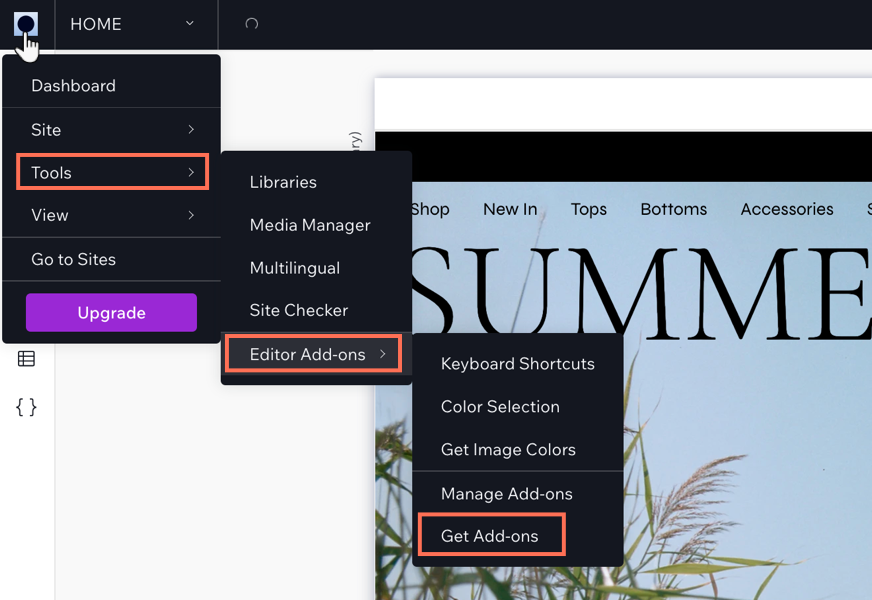
  1. Click the Wix Studio icon  at the top left.

  2. Click Tools.

  3. Click Editor Add-ons.

  4. Click Get Add-ons.

  5. Hover over Task List and click Add.

A screenshot showing the Wix Studio icon and the option to get add-ons.

Once you have added Task List, you can start creating tasks for yourself. When you have finished a task, select the checkmark next to the relevant task and it will move to your 'Completed tasks' section in the add-on.

Need A Professional Website?
Contact Us 
Today!

Wix Events: Adding Rich Media Content to an Event

Wix Events: Adding a Policy Checkbox

Wix Events: Optimizing SEO Settings

Wix Events: Setting Registration Opening & Closing Times in Advance

Wix Events: Customizing Registration Settings & Messages

Wix Events: Customizing the Registration Form for Ticketed Events

Wix Events: Customizing the Registration Form for RSVP Events

Wix Events: Troubleshooting Missing Emails

Wix Events: Managing Emails You Send and Receive

Wix Events: Creating a Hybrid Event

Wix Events: Creating a Private Event

Wix Events: Creating and Managing Event Categories

Wix Events: Creating an Event Schedule

Wix Events: Hosting a Live Streaming Event

Wix Events: Translating Your Event

Wix Events: Creating Online Events

Wix Events: Creating an Online Zoom Event

Wix Events: Hosting an Online Event With Wix Live

Wix Events: Creating a Recurring Event

Wix Events: Creating a Single Event

Wix Events: Understanding Different Types of Events

Wix Events: Understanding the Difference Between RSVP Events and Ticketed Events

Wix Events: Deleting Wix Events

Wix Events: Changing the Email Address for RSVP Notifications

Wix Events: Changing Your Currency

Wix Events: Editing the Date and Time Format

Wix Events: Upgrading Your Site

Wix Events: Adding Additional Event Pages to Your Site

Wix Events: Adding Wix Events to Your Site

Wix Events: About Wix Events

wix experts
Graphic2Traffic web design
©
bottom of page