top of page

Additional Wix Apps

Wix Apps: Colorblind Simulator

The Wix Colorblind Simulator is a valuable add-on that empowers you to experience your site's design from the perspective of visitors with different types of color blindness. This tool is a great way to enhance your site's accessibility.

From the simulator, you can select a page and explore various color blindness experiences to see how the page looks.
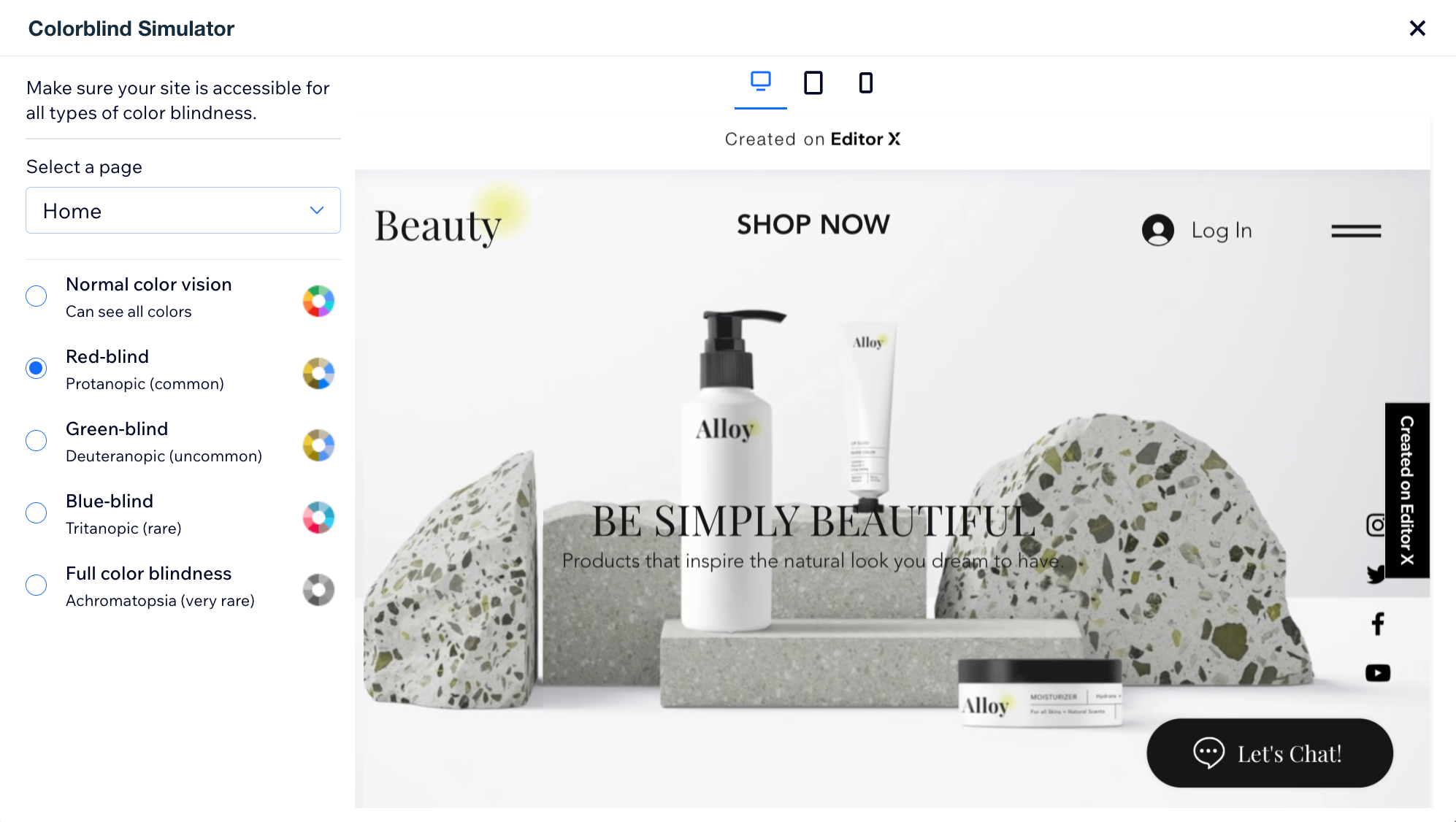
A screenshot showing the Colorblind Simulator UI.

In this article, learn more about:

  • Adding the Colorblind Simulator add-on

  • Frequently asked questions (FAQs)

Adding the Wix Colorblind Simulator

Wix Colorblind Simulator is available in the Wix Studio Editor.

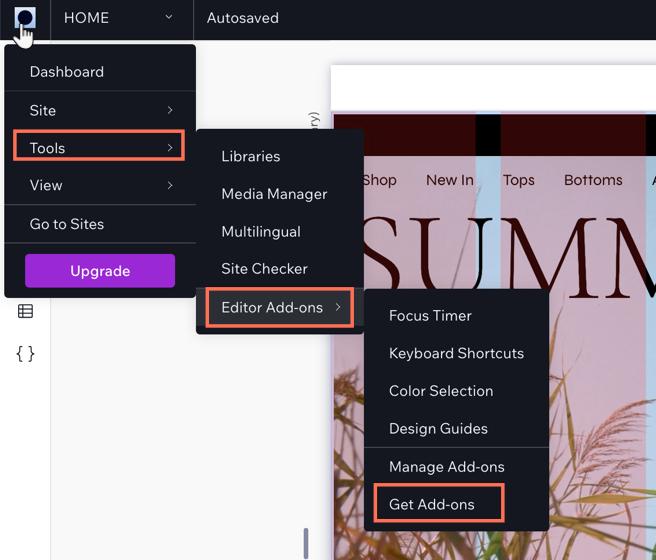
To add the Wix Colorblind Simulator:

  1. Click the Wix Studio icon  at the top left.

  2. Click Tools.

  3. Click Editor Add-ons.

  4. Click Get Add-ons.

  5. Click Colorblind Simulator.

A screenshot showing the Wix Studio icon and the option to Get Add-ons.

FAQs

Click a question below to learn more about accessibility:

Why is accessibility important?

Accessibility is crucial for your site as it ensures inclusivity, allowing all people with disabilities to access your site on an equal basis, complying with legal requirements and fulfilling ethical responsibilities.

It also enhances the visitor experience for all, offering better navigation and readability, potentially improving SEO, expanding the audience reach, and positively influencing your brand's image.

Where can I learn more about accessibility?

Wix offers a variety of accessibility tools to help ensure your site is accessible to everyone. Follow our Checklist for Improving Your Site's Accessibility and learn about our Accessibility Wizard and how it can help make your site a more accessible.

What can I do to improve how a page looks for people with color blindness?

Small things can really help improve how a page looks to people with color blindness. You can change your images, adjust your text and font, and change your site colors to ensure good color contrasts.

Need A Professional Website?
Contact Us 
Today!

Wix Restaurants: Customizing and Designing Your Menu

Wix Restaurants: Setting the Availability of Menus, Sections and Dishes

Wix Restaurants: Creating a Combo Meal

Wix Restaurants: Managing Dish Options

Wix Restaurants: Adding Images to Your Menus

Wix Restaurants: Creating Your Menus

Wix Restaurants: Setting Up Your Availability for Online Reservations

Wix Restaurants: Managing Your Reservation Schedule

Wix Restaurants: Customizing Your Table Reservations Form

Wix Restaurants: Managing Table Reservations and Walk-ins

Wix Restaurants: Managing Your Notifications for Table Reservations

Wix Restaurants: Sending Reservation Notifications to Guests

Wix Restaurants: Setting Up Prepayment for Table Reservations

Wix Restaurants: Adding a Reservation Widget to a Page

Wix Restaurants: Viewing Guest Stats in Wix Table Reservations

Wix Restaurants: Exporting Your Table Reservations

Wix Restaurants: Translating Your Restaurant Reservations

Wix Restaurants: Deleting the Table Reservations App

Wix Restaurants: Creating and Managing your Restaurant Floor Plan

Wix Restaurants: Adding and Setting Up Wix Table Reservations

Wix Restaurants: Creating Another Online Ordering Page

Wix Restaurants: Setting Up Order with Google

Wix Restaurants: Managing Notifications for Online Orders

Wix Restaurants: Saving and Charging Customers' Credit Cards

Wix Restaurants: Managing Orders With DoorDash Drive

Wix Restaurants: Setting Up DoorDash Drive for Your Restaurant

Wix Restaurants: Manually Creating an Order

Wix Restaurants: Manually Printing Online Orders from the Wix App

Wix Restaurants: Troubleshooting Thermal Printing of Online Orders (new) from the Wix App

Wix Restaurants: Printing Online Orders from the Wix App

wix experts
Graphic2Traffic web design
©
bottom of page