top of page

Setting rates & payments

Setting a Weekly or Monthly Rate in Wix Hotels

Important:

This article refers to the original Wix Hotels. If you are using the new Wix Hotels by HotelRunner, which is not yet available to all users, please read the information here. Learn how to check which version of Wix Hotels you are using.

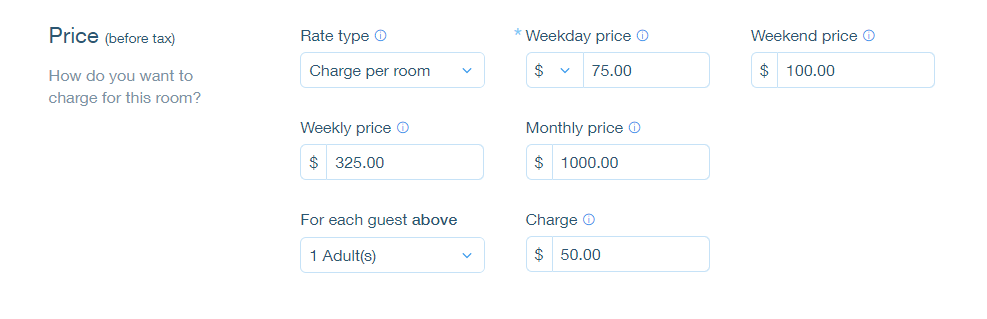
The weekly rate is the rate a guest pays when booking for 7 nights. The monthly rate is the rate a guest pays when booking for 28 nights. Wix Hotels allows you to set the rate at which you want to charge your an individual unit.

To set weekly or monthly rates:

  1. Go to your dashboard.

  2. Click the Hotels tab.

  3. Click the Rooms tab.

  4. Click the Edit icon for an existing room or click Create New to add a new one.

  5. Scroll down to the Price section.

  6. Click More Pricing Options.

  7. Enter the weekly and/or monthly price.

  8. Click Save.

Tip:

  • If a guest books for 8 nights, the rate is calculated as the weekly rate + the daily or weekend rate.

  • If a guest books for 29 nights, the rate is calculated as the monthly rate + the daily or weekend rate.

Need A Professional Website?
Contact Us 
Today!

Wix Bookings: Selecting How You Charge for Bookings Services

Wix Bookings: Offering Packages

Wix Bookings: Creating a Membership Plan

Wix Bookings: About Memberships and Packages

Wix Bookings: About Getting Paid Online

Wix Bookings: Increasing Bookings with the Service Upsell Guru App

Wix Bookings: Adding and Setting Up an Appointment Waitlist

Wix Bookings: Charging a Cancellation or No-Show Fee

Wix Bookings: Editing an Existing Order

Wix Bookings: Adding and Setting Up the Map Plugin on the Service Page

Wix Bookings: Adding Internal Notes on the Bookings List App

Wix Bookings: Letting Clients Check In by Scanning a Chip, Card or Barcode

Wix Bookings: Blocking Off Time for Multiple Staff Members

Wix Bookings: Managing Your Business with the Booking Activity Panel

Wix Bookings: Installing and Setting up the Client Check in App

Wix Bookings: About the Orders Tab

Wix Bookings: Managing Bookings with the Booking List

Wix Bookings: Displaying Class Times on Your Site

Wix Bookings: Scheduling Your Courses

Wix Bookings: Viewing Booking Form Responses

Wix Bookings: Service Times on Live Site Differ from Service Times in Calendar

Wix Bookings: Exporting Reports on Bookings and Staff

Wix Bookings: Viewing a Client's Booking and Payment History

Wix Bookings: Viewing and Editing Client Info

Wix Bookings: Syncing Your Microsoft Calendar

Wix Bookings: Filtering Your Booking Calendar

Wix Bookings: Syncing Your Apple Calendar

Wix Bookings: Syncing Bookings and Google Calendars

Wix Bookings: About Syncing Personal Calendars with Wix Bookings

Wix Bookings: Adding a Note to a Specific Booking Session

wix experts
Graphic2Traffic web design
©
bottom of page