top of page

Setting rates & payments

Setting a Weekly or Monthly Rate in Wix Hotels

Important:

This article refers to the original Wix Hotels. If you are using the new Wix Hotels by HotelRunner, which is not yet available to all users, please read the information here. Learn how to check which version of Wix Hotels you are using.

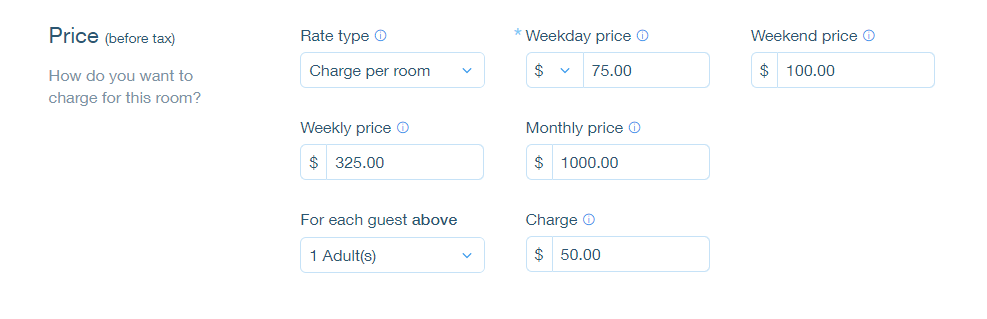
The weekly rate is the rate a guest pays when booking for 7 nights. The monthly rate is the rate a guest pays when booking for 28 nights. Wix Hotels allows you to set the rate at which you want to charge your an individual unit.

To set weekly or monthly rates:

  1. Go to your dashboard.

  2. Click the Hotels tab.

  3. Click the Rooms tab.

  4. Click the Edit icon for an existing room or click Create New to add a new one.

  5. Scroll down to the Price section.

  6. Click More Pricing Options.

  7. Enter the weekly and/or monthly price.

  8. Click Save.

Tip:

  • If a guest books for 8 nights, the rate is calculated as the weekly rate + the daily or weekend rate.

  • If a guest books for 29 nights, the rate is calculated as the monthly rate + the daily or weekend rate.

Need A Professional Website?
Contact Us 
Today!

Wix Stores: Offering Customers a Choice of Delivery Options

Wix Stores: A Guide to Setting Up Shipping, Delivery, and Pickup

Wix Stores: Displaying Product Categories on Mobile

Wix Stores: Displaying Product Subcategories

Wix Stores: SEO for Category Pages

Wix Stores: Displaying Product Categories

Wix Stores: About the Category Page

Wix Stores: Creating Product Categories

Wix Stores: About Product Categories

Wix Stores: Managing Your Product List

Wix Stores: Customizing the Product List and Saving Your View

Wix Stores: Product Import Error Messages

Wix Stores: Exporting Your Product List

Wix Stores: Importing Products to Wix Stores

Wix Stores: Sharing Products on Social Media

Wix Stores: Changing the Order of Products in a Category

Wix Stores: Deleting Store Products

Wix Stores: Managing Product Subscriptions

Wix Stores: Selling Product Subscriptions

Wix Stores: Editing Multiple Products at the Same Time

Wix Stores: Searching for Products in the Store Products Tab

Wix Stores: Changing the Visibility of a Product

Wix Stores: Calculating Cost of Goods

Wix Stores: Managing Product Ribbons

Wix Stores: Displaying Product Prices as a Price Range

Wix Stores: Displaying the Product Price per Unit

Wix Stores: Scheduling Product Discounts Using the Wix Store Scheduler App

Wix Stores: Applying Sale Prices to Store Products

Wix Stores: Allowing Customers to Pre-Order Products

Wix Stores: Allowing Customers to Add a Message When Purchasing a Product

wix experts
Graphic2Traffic web design
©
bottom of page