top of page

Setting rates & payments

Setting a Weekly or Monthly Rate in Wix Hotels

Important:

This article refers to the original Wix Hotels. If you are using the new Wix Hotels by HotelRunner, which is not yet available to all users, please read the information here. Learn how to check which version of Wix Hotels you are using.

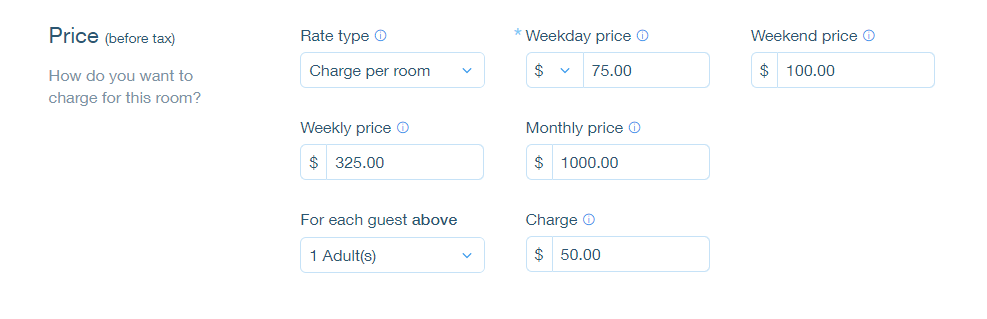
The weekly rate is the rate a guest pays when booking for 7 nights. The monthly rate is the rate a guest pays when booking for 28 nights. Wix Hotels allows you to set the rate at which you want to charge your an individual unit.

To set weekly or monthly rates:

  1. Go to your dashboard.

  2. Click the Hotels tab.

  3. Click the Rooms tab.

  4. Click the Edit icon for an existing room or click Create New to add a new one.

  5. Scroll down to the Price section.

  6. Click More Pricing Options.

  7. Enter the weekly and/or monthly price.

  8. Click Save.

Tip:

  • If a guest books for 8 nights, the rate is calculated as the weekly rate + the daily or weekend rate.

  • If a guest books for 29 nights, the rate is calculated as the monthly rate + the daily or weekend rate.

Need A Professional Website?
Contact Us 
Today!

Wix Events: Adding Rich Media Content to an Event

Wix Events: Adding a Policy Checkbox

Wix Events: Optimizing SEO Settings

Wix Events: Setting Registration Opening & Closing Times in Advance

Wix Events: Customizing Registration Settings & Messages

Wix Events: Customizing the Registration Form for Ticketed Events

Wix Events: Customizing the Registration Form for RSVP Events

Wix Events: Troubleshooting Missing Emails

Wix Events: Managing Emails You Send and Receive

Wix Events: Creating a Hybrid Event

Wix Events: Creating a Private Event

Wix Events: Creating and Managing Event Categories

Wix Events: Creating an Event Schedule

Wix Events: Hosting a Live Streaming Event

Wix Events: Translating Your Event

Wix Events: Creating Online Events

Wix Events: Creating an Online Zoom Event

Wix Events: Hosting an Online Event With Wix Live

Wix Events: Creating a Recurring Event

Wix Events: Creating a Single Event

Wix Events: Understanding Different Types of Events

Wix Events: Understanding the Difference Between RSVP Events and Ticketed Events

Wix Events: Deleting Wix Events

Wix Events: Changing the Email Address for RSVP Notifications

Wix Events: Changing Your Currency

Wix Events: Editing the Date and Time Format

Wix Events: Upgrading Your Site

Wix Events: Adding Additional Event Pages to Your Site

Wix Events: Adding Wix Events to Your Site

Wix Events: About Wix Events

wix experts
Graphic2Traffic web design
©
bottom of page