top of page

Using the Wix app for Online Programs

Online Programs: Connecting a Group to Your Program in the Wix App

Connect a group to your program using the Wix app. This gives participants a place to discuss their progress and share updates to motivate each other to complete the program. You can connect an existing group or create a new one straight from the app.

To connect a group to your program in the Wix app:

  1. Go to your site in the Wix app.

  2. Tap Manage  at the bottom.

  3. Tap Online Programs.

  4. Tap the More Actions icon  next to the relevant program.

  5. Tap the Edit.

  6. Scroll down to Group and tap Connect a Group.

  7. Choose what you want to do:Connect an existing group to the program: Select a group from the list and tap Done.
    Note: Once a group is linked to the program, anyone who joins your program automatically joins the group.

    Create a new group for the program:Tap Create New Group.
    Enter the group details including the name, cover image, and privacy setting. Learn more about creating a group using the Wix app.
    Tap Done.

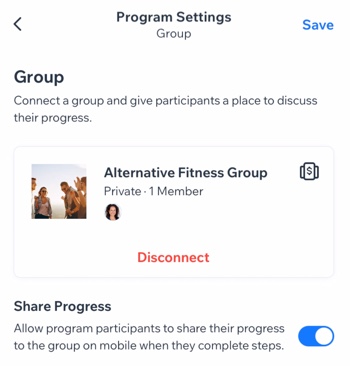
  8. (Optional) Enable the Share Progress toggle to allow participants to share their progress to the group when they complete steps.

  9. Tap Save.

A screenshot of the Program Settings panel with a connected group.

Want to disconnect the group?

If the group is no longer relevant to your program (e.g. the program has ended or you want to add different one), you can remove the group from your program. Tap Disconnect under the group.

Need A Professional Website?
Contact Us 
Today!

Wix Events: Creating Membership Plans Using the Wix App

Wix Events: Customizing Events Displayed in the Member Apps

Wix Events: Changing Registration Settings Using the Wix App

Wix Events: Inviting Guests to Join an Event from the Wix App

Wix Events: Managing Event Orders Using the Wix App

Wix Events: Starting Discussions with Event Guests on the Wix Member Apps

Wix Events: Creating Event Coupons Using the Wix App

Wix Events: Managing Guests and Events Using the Wix App

Wix Events: Broadcasting a Message to Guests Using the Wix App

Wix Events: Checking-In Guests Using the Wix App

Wix Events: Creating a Ticketed Event Using the Wix App

Wix Events: Creating an RSVP Event Using the Wix App

Wix Events: Creating Gift Cards

Wix Events: Promoting Your Event With Hopp

Wix Events: Using Wix Automations to Promote an Event

Wix Events: Adding and Setting up a Loyalty Program

Wix Events Troubleshooting: Unable to Apply Coupons in Wix Events

Wix Events: Creating Event Coupons

Wix Events: Creating a Membership Plan

Wix Events: Promoting Your Events

Wix Events: Sending Invitations or Promotions Using Email Marketing

Wix Events: Creating Invoices for Ticketed Events

Wix Events: Understanding Wix Analytics Reports

Wix Events: Canceling and Refunding Orders for Events with Tickets

Wix Events: Managing Ticket Orders

Wix Events: Viewing and Managing Your Event Tickets

Wix Events: Adding Tax to Tickets Sales

Wix Events: Collecting Guest Info for Individual Event Tickets

Wix Events: Setting Up a Payment Method

Wix Events: About Wix Ticket Service Fees

wix experts
Graphic2Traffic web design
©
bottom of page